From Free Chat to Agents: A Starting Guide
Why the free chat gives you wrong answers and the five steps that fix most of it.
There is a pattern I keep seeing.
Someone opens a free chat window. They ask a real question. The answer comes back fast, fluent and sure of itself.
Part of it is wrong. Part of it is missing. Nothing in the answer says so.
They try twice more. Same thing. They close the tab and decide AI is overhyped.
That conclusion is reasonable. It is based on the wrong product.
The free chat is the smallest version of the thing, with most of the useful parts switched off. Judging AI on it is like judging cars on a rental with the handbrake on.
This is the starting guide. It is the page I send people to when they tell me AI doesn't work. It explains why the free chat lets you down, what the real thing is made of and the five steps that move you from chat to agents.
No vendor deep dives here. Those come in the next parts.
1. Why the free chat gets it wrong
Six reasons. They stack.
The free plan runs a smaller model
A model is the part that reads your text and writes the reply. They come in sizes. Bigger models cost more to run and know more. Smaller ones are cheaper, faster and wrong more often.
Every vendor gives the free plan a smaller model and keeps the best one for paying users. I checked the plan pages on 13 November 2026:
- ChatGPT Free runs GPT-6 Luna. GPT-6.1 Sol needs Plus, at $20 a month.
- Claude Free runs Sonnet and Haiku. Opus needs Pro, at $20 a month.
- Gemini Free gets the Flash-Lite model and Gemini 4 Hydrogen. The Pro model needs AI Pro, at $19.99 a month.
How big is the gap? Artificial Analysis runs a test called AA-Omniscience [1]. It asks hard factual questions across many fields and counts how many come back right.
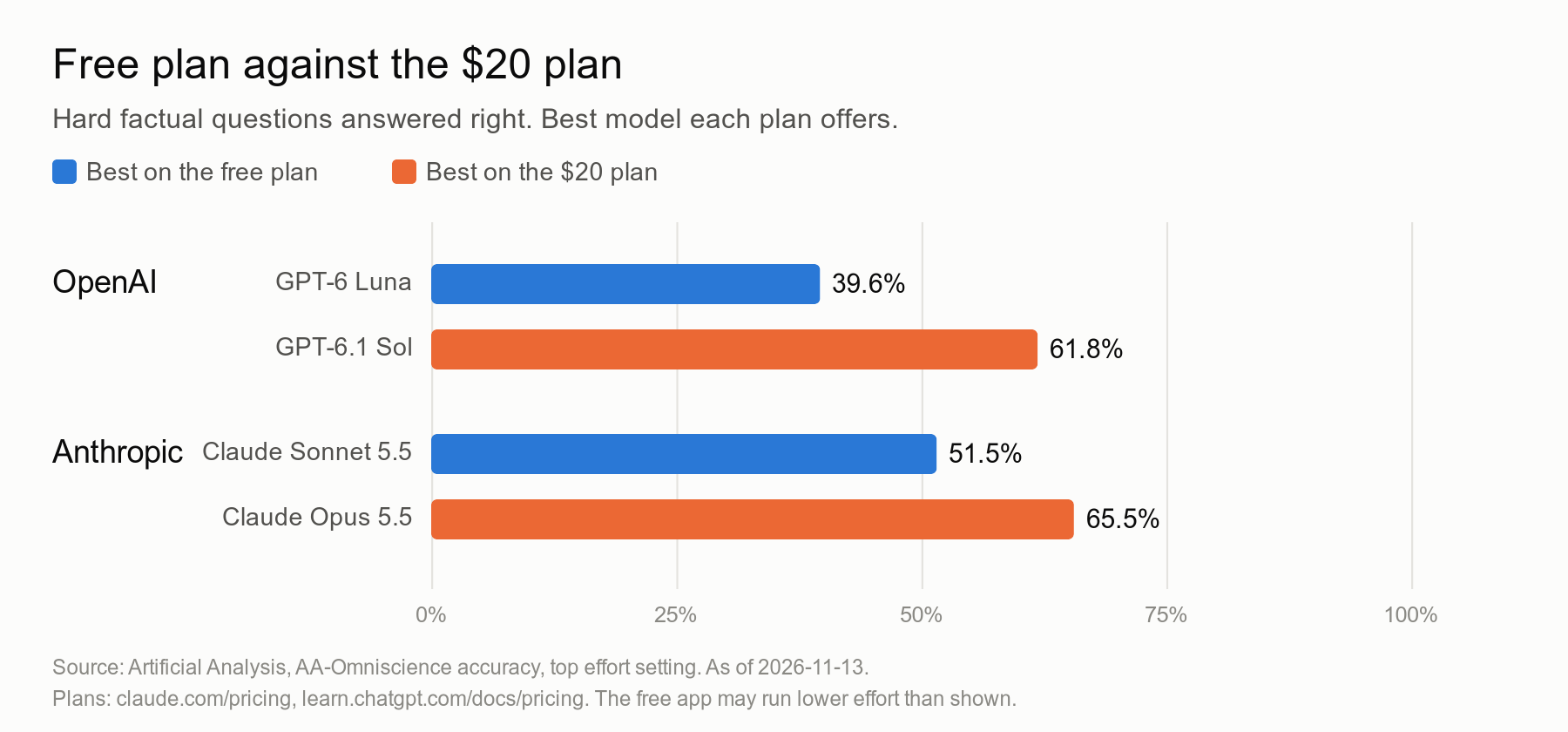
OpenAI's free model gets 39.6% right. The $20 one gets 61.8%.
Anthropic's free model gets 51.5%. The $20 one gets 65.5%.
That is the same question, the same company, a different plan. On OpenAI's side the paid model answers about half as many questions again correctly.
The free plan is a demo of the product, not the product.
One honest caveat. These scores are run at the highest effort setting. The free app may run its model at a lower setting than that. So the real gap you meet on a free plan is likely wider, not narrower.
Google is the generous one. Gemini's free plan includes a strong model, with a quarter of the usage of the paid plan. If you refuse to pay anything, start there.
Thinking is off, or rationed
Newer models can "think" before they answer. They write a hidden draft, check it, then reply. Vendors call this reasoning or thinking mode. It is slower and costs more to run, so free plans ration it or leave it off.
The difference is not small. Same model, GPT-6.1 Terra, same test. With thinking off it gives a wrong answer instead of saying "I don't know" 77.1% of the time. With thinking at maximum it does so 34.5% of the time [1].
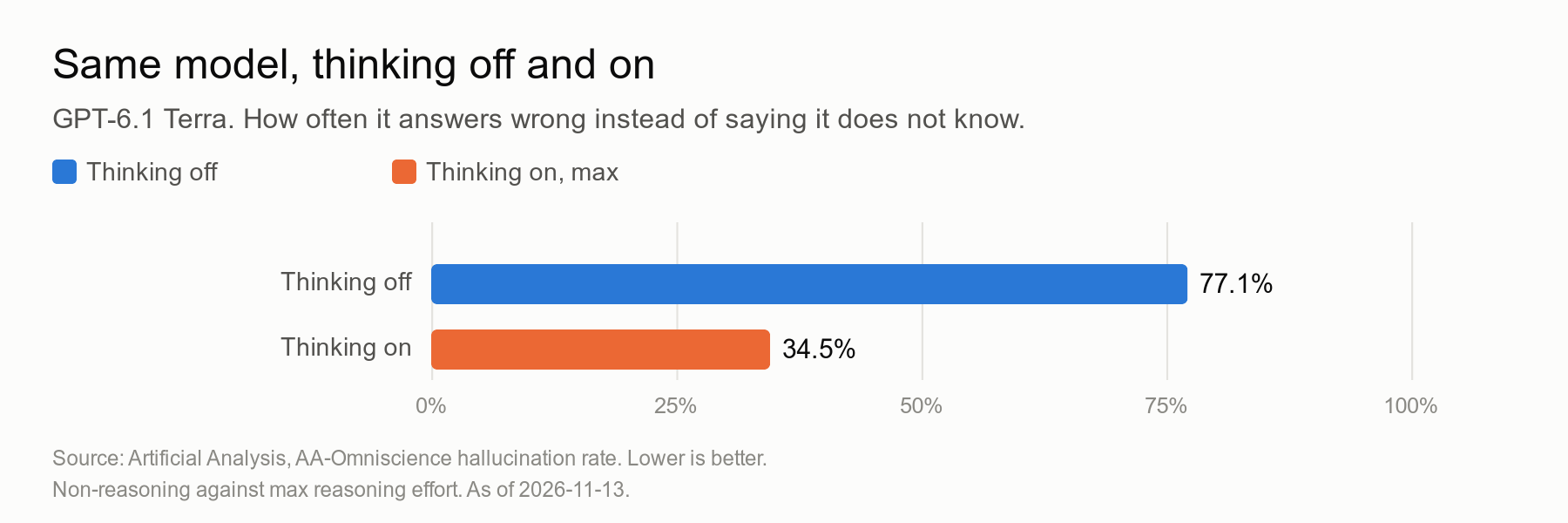
Same brain. Less than half the confident nonsense. One switch.
Search is off
A model learns from a snapshot of text that ends on a date. After that date it knows nothing. Ask about a price, a law or a product from last month and it fills the gap with something plausible.
Web search fixes that. The chat looks the answer up and shows you where it came from. On many free setups search is limited, or only runs when the model decides it needs it.
It knows nothing about you
You know your goal, your budget, your constraints and what you tried last week. The model knows none of it.
So it answers the average question from the average person. Then you get an average answer and call it generic.
It doesn't check itself
A plain chat writes the answer once, top to bottom. Then it hands it over. No second pass. No sources unless you ask. Nobody reviews it.
It agrees with you
This one is measured. Researchers at Anthropic tested five leading assistants and found they tend to agree with the user, even when the user is wrong [2]. People and the models that score answers both sometimes preferred a convincing answer that agreed with them over a correct one.
A second paper explains why models guess at all [3]. Training and testing reward a confident guess over "I don't know". So the model learns to guess.
Put the six together. A small model, no time to think, no fresh facts, no context, no check, keen to please. That is the free chat.
The wrong answers aren't a mystery. They're the design.
2. The map: three layers
Every answer you get comes from three layers.
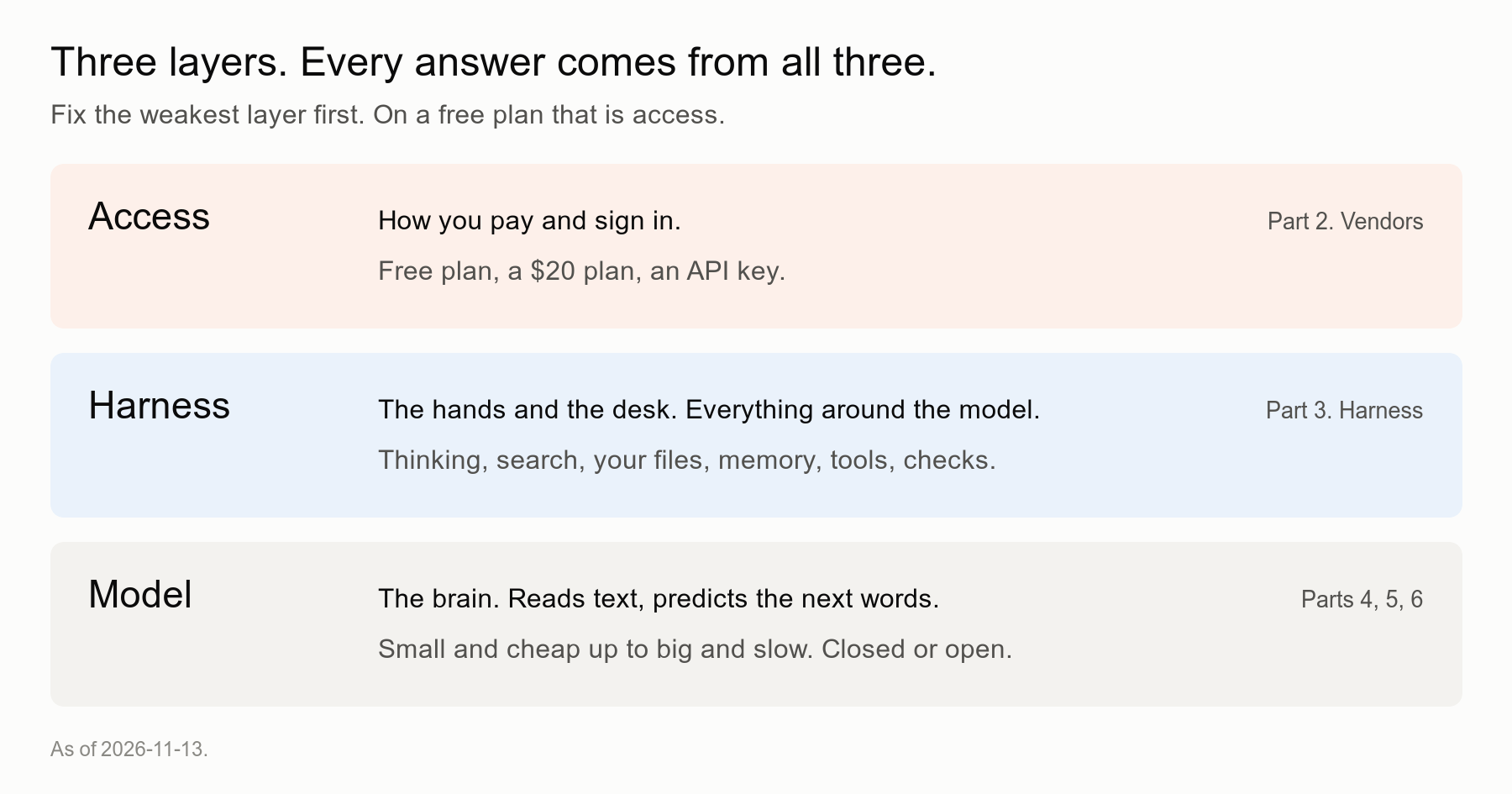
The model is the brain. It reads text and predicts the next words. Some are small and cheap, some big and slow. Some are closed, some you can download.
The harness is everything around the model. The hands and the desk. Thinking time, search, your files, memory, tools, checks. The same model in a better harness gives a much better result.
Access is how you pay and sign in. A free plan, a $20 plan, or an API key: a password that lets software call the model directly and bills you per use.
When an answer is bad, one of the three layers is weak. On a free plan the weakest one is access. Access decides which model you get and which parts of the harness are switched on.
Fix that first.
3. Three levels: chat, assistant, agent
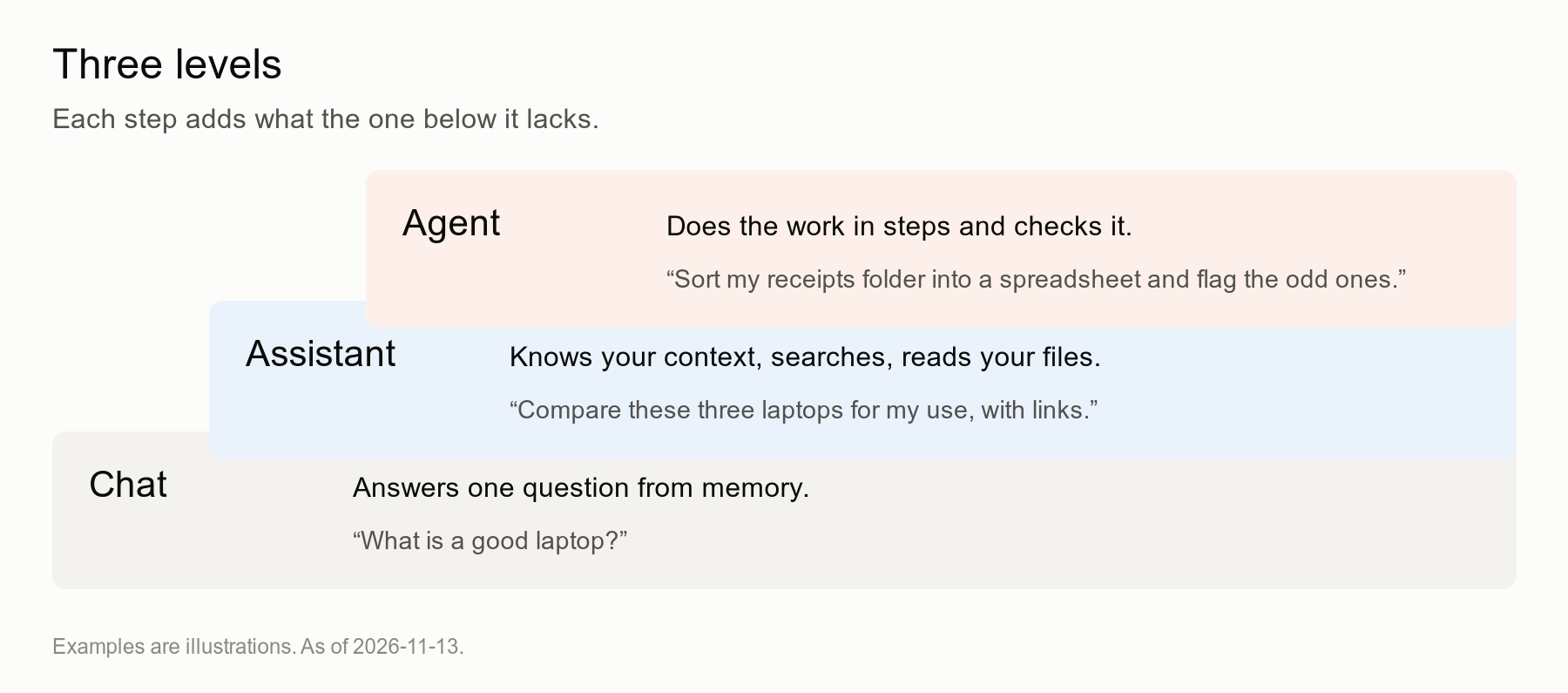
Chat answers one question from memory. "What is a good laptop?" You get a list that could be from any year.
Assistant knows your context, searches the web and reads your files. "Compare these three laptops for my use, with links." You get an answer for you, with sources you can open.
Agent does the work in steps and checks it. "Sort my receipts folder into a spreadsheet and flag the odd ones." It opens the files, builds the sheet, checks the totals and tells you what it could not read.
An agent is a model in a loop. It plans, uses a tool, looks at the result, decides the next step and keeps going until the task is done or it gets stuck.
Each level needs the one below it. You can't run an agent well if you don't know how to brief an assistant.
4. Five steps
Step 1. Pay for one plan. Turn thinking and search on.
About $20 a month. One vendor, not three. Part 2 compares them.
This is the single biggest jump. It buys you the best model, more thinking, more search and the agent tools in the next steps. Cowork from Anthropic is not on the free plan. Codex in the browser and in the terminal starts at ChatGPT Plus.
Then find the switches. Every app has a model picker and a thinking or reasoning toggle. Pick the top model. Turn thinking on. Turn search on.
To see what AI can do, you need at least the $20 plan. Everything below it is a sample.
If $20 is a real problem, use Gemini's free plan and turn on everything it offers.
Step 2. Give it context
The prompts in this section are examples. Swap in your own.
Before:
What should I eat to lose weight?
After:
I'm in my forties. I cycle twice a week. I cook for a family of four and I hate meal prep on Sundays. I want to lose 5 kg in four months without counting calories. Suggest a weekly pattern I can actually keep.
Better still, make it permanent. Most paid apps have projects: a folder with your files and a standing instruction that applies to every chat inside it. Put your context there once.
Step 3. Ask in structure
Four parts: goal, context, constraints, output.
Before:
Write an email to my landlord about the heating.
After:
Goal: get the heating fixed this week.
Context: broken since Monday, I reported it by phone on Tuesday, nothing happened.
Constraints: polite, firm, under 120 words, no threats.
Output: the email, then a one-line subject.
The model is good at following a brief. It is bad at guessing one.
Step 4. Make it check itself
The model doesn't verify unless you ask. So ask.
Before:
What are the rules for renting out my flat short term in Milan?
After:
What are the rules for renting out my flat short term in Milan? Search the web. Cite the official source for each rule with a link. Then list what you could not confirm and what I should check with the city myself.
And after any long answer:
Now review your answer as a sceptical expert. What is wrong, missing or out of date?
That second prompt costs you ten seconds. It catches more than you would expect.
Step 5. Run a first agent on a small real task
Pick something boring, real and low-risk. A folder of receipts. A messy downloads directory. Twenty PDFs you need summarized into one page.
Use the agent tool in your paid plan. Claude Cowork works on a folder you choose on your computer. ChatGPT has a Work mode in its desktop app. Codex runs from the browser or the terminal.
Before:
Can you help me organize my receipts?
After:
In the folder Receipts-2026, read every file. Build a spreadsheet with date, shop, amount, currency and category. Flag anything you could not read and any duplicate. Don't move or delete any file. When done, tell me what you checked and what you are unsure about.
Give it a folder, not your whole disk. Tell it what it must not do. Read its report before you trust the sheet.
5. What goes wrong next
You trust the agent too much. It sounds sure when it is wrong, same as the chat. Check the first few runs line by line. Loosen up when it earns it.
You paste private data without reading the settings. Some plans can use your chats to improve their models. Find the data settings and read them before you paste a contract, a medical letter or anything about someone else.
You get a surprise bill. A subscription has a fixed price. An API key bills per use. An agent in a loop can use a lot. If you go the key route, set a spending limit first. Part 2 covers this.
You give up after one bad run. One run tells you little. Change the brief, add context, ask it to check. Three tries with a better prompt beat one try and a verdict.
6. Where I would start
Tonight, pay for one $20 plan. Pick the top model, turn thinking and search on.
Then paste the prompt at the end of this piece. It interviews you and writes your standing instruction.
Tomorrow, run one small agent task on a folder you don't care much about. Read what it did.
That's it. A week of this and the free chat will feel like a toy.
What I am probably getting wrong. I lean on one benchmark for the free against paid gap. AA-Omniscience tests hard factual recall. Your questions may be easier and the gap smaller. I also can't measure what effort setting each free app really uses. Vendors change their free plans every few months. The prices and model names here are as of 13 November 2026. Check them before you buy.
The free chat is AI at its cheapest.
Cheap was the point.
Pay for the real one, then judge it.
TL;DR
- Free chat gives worse answers by design: smaller model, rationed thinking, limited search, no context, no checking, a habit of agreeing with you.
- On a hard factual test, OpenAI's free model gets 39.6% right and the $20 one 61.8%. Anthropic: 51.5% against 65.5%.
- Thinking on cuts confident wrong answers from 77.1% to 34.5% on the same model.
- Every answer comes from three layers: model, harness, access. On a free plan, fix access first.
- Three levels: chat, assistant, agent.
- Five steps: pay about $20 and switch on thinking and search, give context, ask in structure, make it check itself, run a first agent on a small task.
- To see what AI can do, you need at least the $20 plan.
Set me up
Copy this into your new paid chat. Thinking on. It does the rest.
You are going to set me up to use you well.

Interview me, one question at a time, about:
1. My work and what I spend most time on
2. My goals for the next three months
3. Tools, files and apps I use every day
4. How I like answers: length, tone, format
5. Things I never want you to do

After the interview, write my standing instruction:
under 200 words, in the second person, ready to paste
into my settings or a project. Include a rule that you
search and cite sources for any fact that can change,
and that you say "I don't know" when you don't.

Then suggest three small tasks from my answers that
an agent could do for me this week, each with a
ready-to-use prompt.
Where to go next
- Part 2. Vendors. Who sells what. Subscription against sign-in against API key.
- Part 3. Harness. Why the same model gives a different result. The tools that make the difference.
- Part 4. Open. Open-weight models, Hugging Face and OpenRouter.
- Part 5. Specialist. The models that are not chat: image, speech, music, 3D, documents.
- Part 6. Local. Running models on your own machine.
To see the latest model rankings yourself: Artificial Analysis (artificialanalysis.ai) and Arena, formerly LMArena (arena.ai/leaderboard).
References
[1] Artificial Analysis, AA-Omniscience accuracy and hallucination rate, read 13 November 2026. https://artificialanalysis.ai
[2] Sharma, M. et al. "Towards Understanding Sycophancy in Language Models." arXiv 2310.13548. https://arxiv.org/abs/2310.13548
[3] Kalai, A. T., Nachum, O., Vempala, S. S., Zhang, E. "Why Language Models Hallucinate." arXiv 2509.04664. https://arxiv.org/abs/2509.04664
[4] Plan pages, read 13 November 2026: https://claude.com/pricing, https://gemini.google/subscriptions, https://learn.chatgpt.com/docs/pricing