Beyond Chat: Models That Draw, Read, Speak and Build
Images, illustration, video, documents, voice, music and 3D. What leads, what is open and what it costs.
Part 1 drew a map with three layers: access, harness, model.
This part stays on the model layer and leaves chat behind.
A chat model takes text and returns text. Many jobs are not text.
People get this wrong in two directions.
Some ask the chat model for everything. It reads a scan badly, then they decide AI cannot read scans.
Others assume each of these jobs needs an expensive subscription. Several of the best tools here are free files of a few gigabytes.
This part explains eight kinds of specialist model. For each one: what it is for, who leads, the best open pick and the cheapest way to try it.
I read the leaderboards, the model cards, the licence files and the price lists on 13 and 14 November 2026. Every figure carries its date.
1. What a specialist model is
A specialist does one kind of job. It takes one kind of input and returns one kind of output. A picture from a sentence. Text from a recording. A 3D shape from a photo.
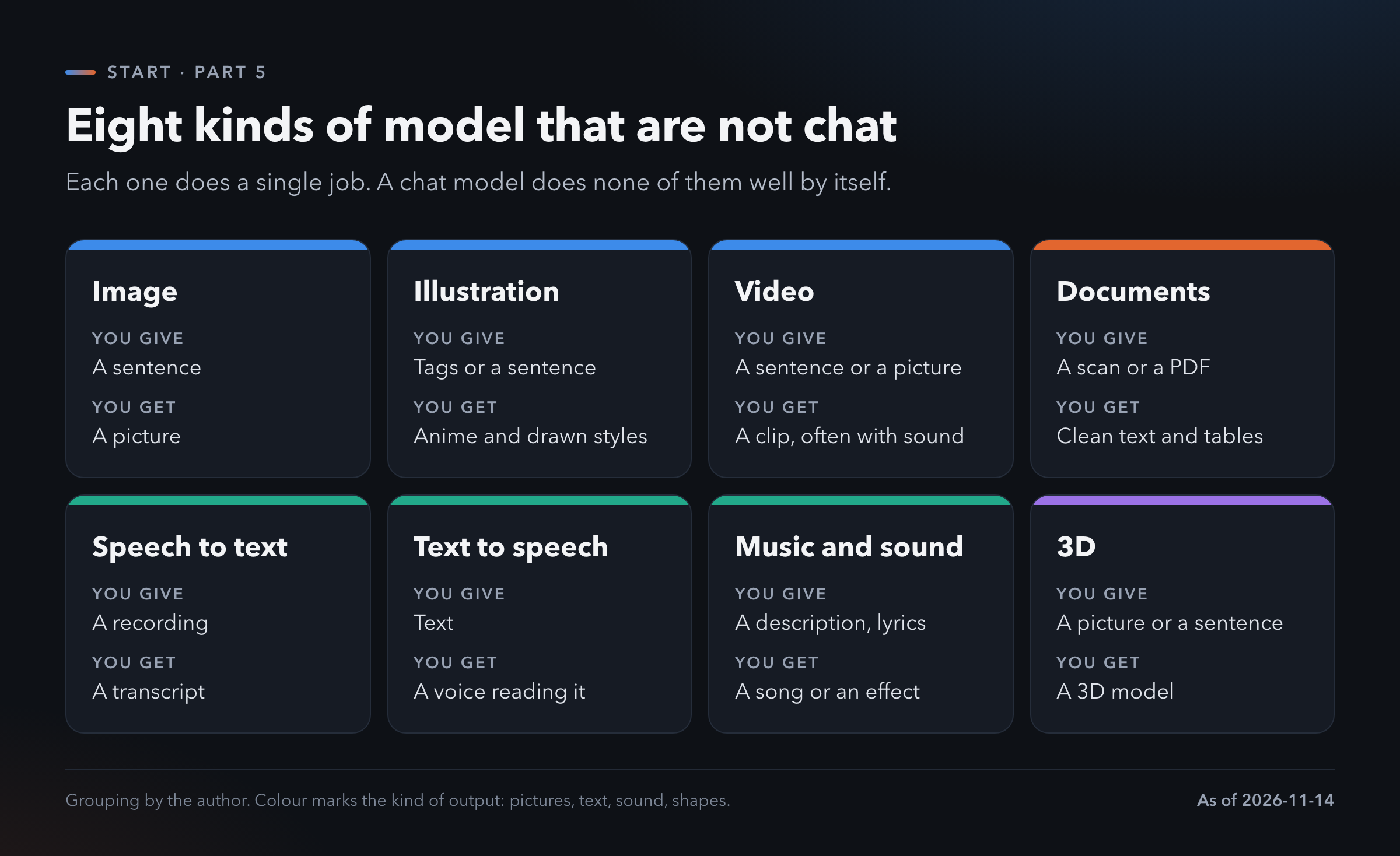
Why not just use chat? Sometimes you can. The big chat apps call a specialist behind the curtain when you ask for a picture. You get whichever one the vendor chose, at the settings the vendor chose.
Going to the specialist directly gives you the choice. A better model, a cheaper one or one that runs on your own machine.
How they are ranked. Most of the boards in this part use blind votes. A person sees two results for the same request with the names hidden. They pick the better one. Thousands of votes become a score called Elo. A higher number means people preferred it more often.
A gap of ten or twenty points is noise. A gap of a hundred is something you can see.
The same three questions each time. Who is at the top. What is the best one I can download. What is the cheapest way to try.
2. Images
What it is for. Illustrations for a post, product mock-ups, a logo draft, a picture for a presentation. Also editing: change the background, swap the colour, remove an object.
Who leads. Artificial Analysis ranks 88 text-to-image models by blind vote [1]. GPT Image 2.6 Sunburst is first with 1261 points. The next group sits about 80 points lower and is tightly packed: Kling Image 4.0, Nano Banana 2.1, MAI-Image-2.6 and Grok Imagine Image 2.0 are all between 1167 and 1180.
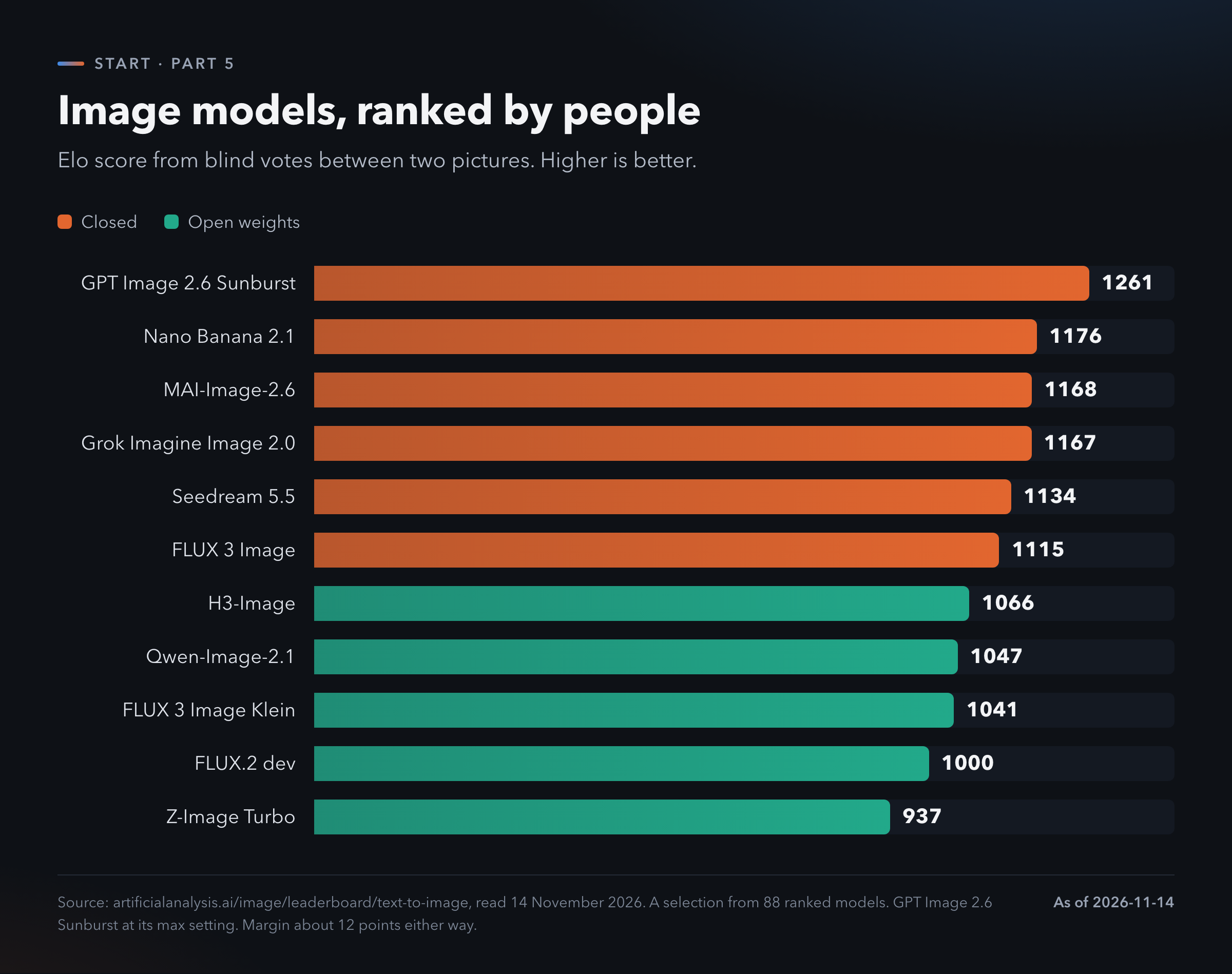
The best open pick. The highest open model on the board is H3-Image from MiniMax at 1066. Its licence does not cover the EU, the UK, South Korea or the USA [2]. If you live in one of those places, skip it.
Qwen-Image-2.1 is next at 1047. Its licence is non-commercial.
The clean choice is the FLUX.2 klein family from Black Forest Labs. The 4B version carries an Apache 2.0 licence, which allows business use [2]. A newer sibling, FLUX 3 Image Klein, scores 1041 on the board. It has its own licence, so read that one before business use.
What it costs. The spread is wide. The top model costs 210.72 dollars for a thousand pictures at its highest setting. That is 21 cents a picture. Z-Image Turbo costs 5 dollars for a thousand, half a cent each.
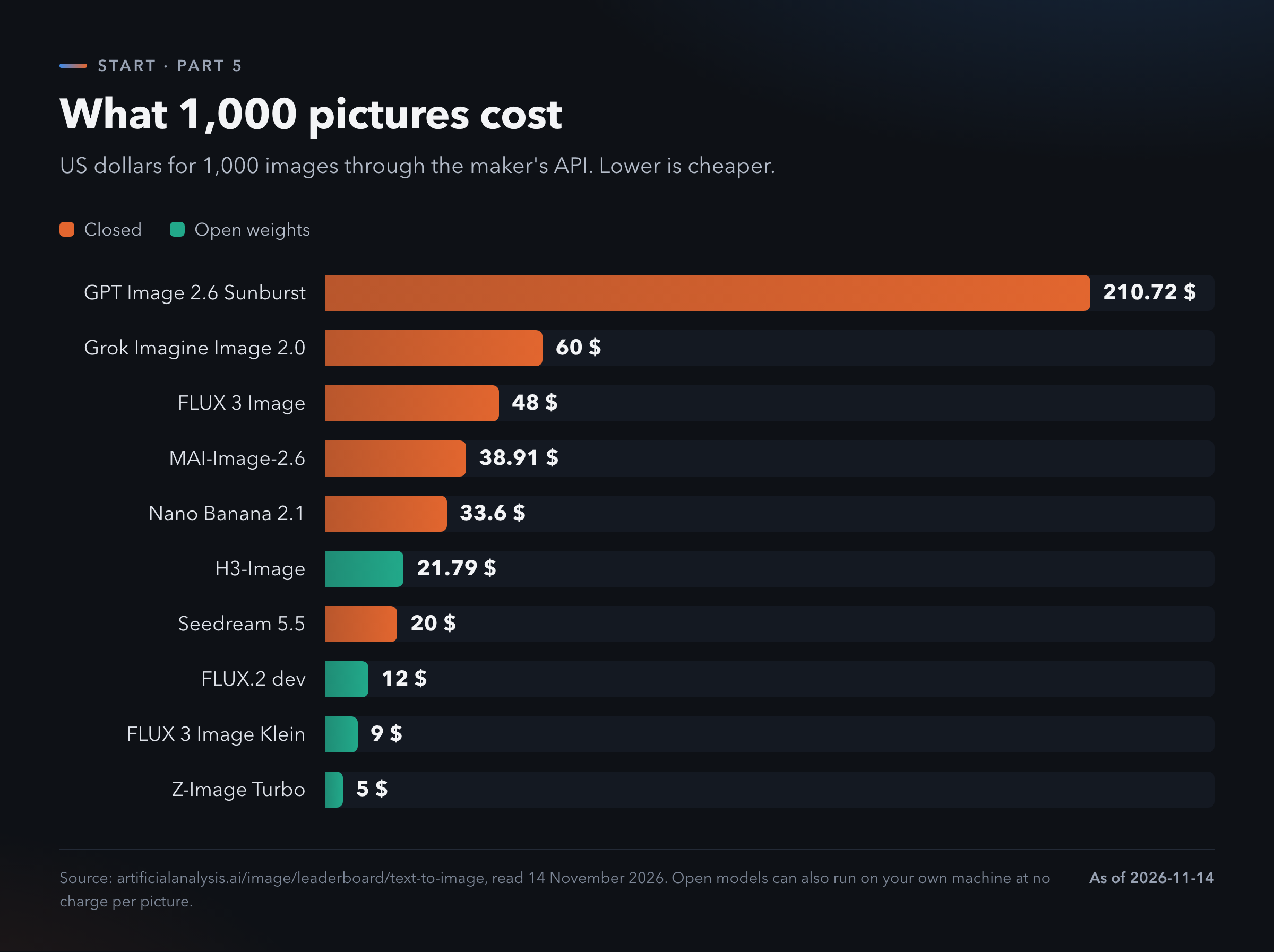
Nano Banana 2.1 is the one to look at. It sits in the second group on quality and costs 33.60 dollars per thousand, a sixth of the leader.
The cheapest way to try. Hosts such as fal.ai and Replicate sell these models by the picture. You pay for what you make.
To run an open model on your own machine, the common tool is ComfyUI. It is free. You load a model file and connect boxes on a canvas. It looks strange for an hour. Part 6 covers what your computer can run.
3. Illustration and anime
Why it gets its own section. The general image models draw everything. A large community wants one thing done very well: anime and illustration in a consistent style. That community trains its own models and shares them.
There is no board. I found no blind-vote ranking for these models. The signal is what people download and what they post.
Where to look. Civitai is the gallery where this community shares models and example pictures [3]. The trending list for text-to-image on Hugging Face is the second place [2].
The names you will meet. Anima is the current favourite. It has 2 billion parameters and more than 2 million downloads. It accepts both plain sentences and the tag vocabulary this community uses. Its licence is non-commercial [2].
Animagine XL 4.0 is the older, lighter option, with about a million downloads. Its licence is more permissive. Read it before selling anything made with it.
NoobAI-XL, Illustrious and Pony are other families you will see on Civitai.
The cheapest way to try. Download one and run it in ComfyUI. The model costs nothing.
A caution. These models learned from fan art collections. If you plan to sell the output, the licence of the model is only the first thing to check.
4. Video
What it is for. Short clips. A few seconds for a social post, a product shot that moves, a storyboard. The newer models make the sound at the same time.
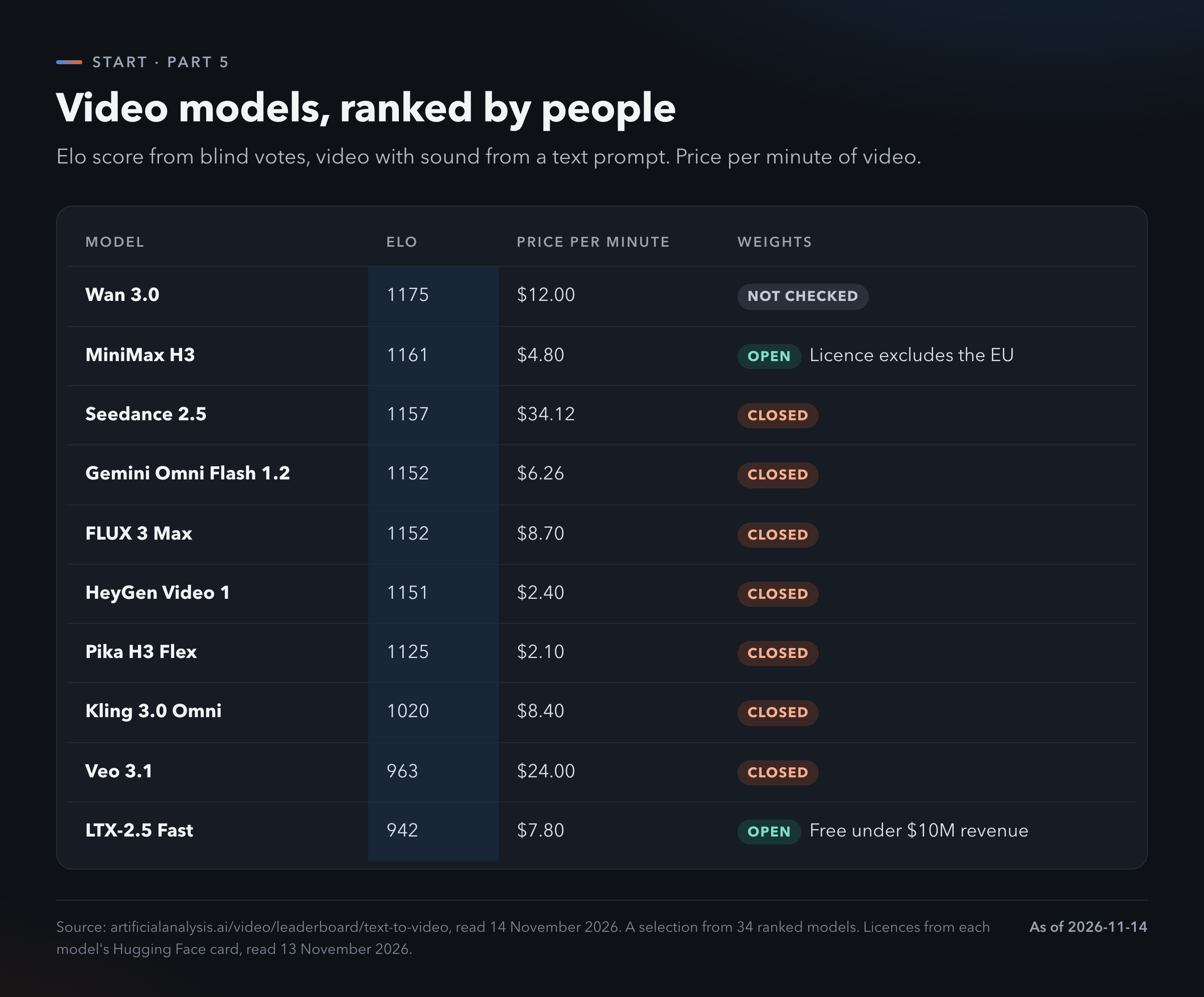
Who leads. Artificial Analysis ranks 34 models that make video with audio [4]. The top is crowded. Wan 3.0 has 1175 points. Utopai X has 1172. MiniMax H3 has 1161 and Seedance 2.5 has 1157. With margins this small, the first four are level.
A name that is gone. Sora was the model that made this field famous. OpenAI closed the app on 26 April 2026 and the API on 24 September 2026 [5]. Tools change fast here. Do not build a business on one of them.
The best open pick. MiniMax H3 is third on the board and its weights are public. It makes clips of 4 to 15 seconds with sound. The same regional exclusion applies: no EU, UK, South Korea or USA [2].
LTX-2.5 from Lightricks is the practical open choice. It scores 942, well below the leaders. It is free for businesses with under 10 million dollars of yearly revenue [2]. Wan 2.2 is an older open model under Apache 2.0.
I could not confirm whether the weights of Wan 3.0 are public.
What it costs. Video is the expensive family. Seedance 2.5 costs 34.12 dollars per minute of video. Pika H3 Flex costs 2.10. HeyGen Video 1 costs 2.40 and scores within 25 points of the top.
The cheapest way to try. Make a ten-second clip on a cheap hosted model. It costs about 35 cents at Pika's rate. Running video on your own machine needs a large graphics card. The model cards do not state a minimum, so I give none.
5. Documents
What it is for. This is the least glamorous family and the most useful. A scanned invoice becomes a table. A PDF with two columns and a chart becomes clean text. A photo of a form becomes data.
The old name is OCR, optical character recognition. The new models do more. They keep the layout: headings, tables, formulas, reading order.
Why chat models struggle here. A chat model looks at the page as a picture and describes it. On a long or dense document it skips lines and invents numbers. A document model is trained for exactly this page-to-text job.
Who leads. OmniDocBench is the public test, run by OpenDataLab [6]. It scores from 0 to 100. In version 1.6, OXR-1.0 is first with 97.03. TeleOCR has 96.91.
The open models are right behind. MiniCPM-OCR 1.0 scores 96.44. PaddleOCR-VL-1.6 scores 96.34. That is less than one point from the top.
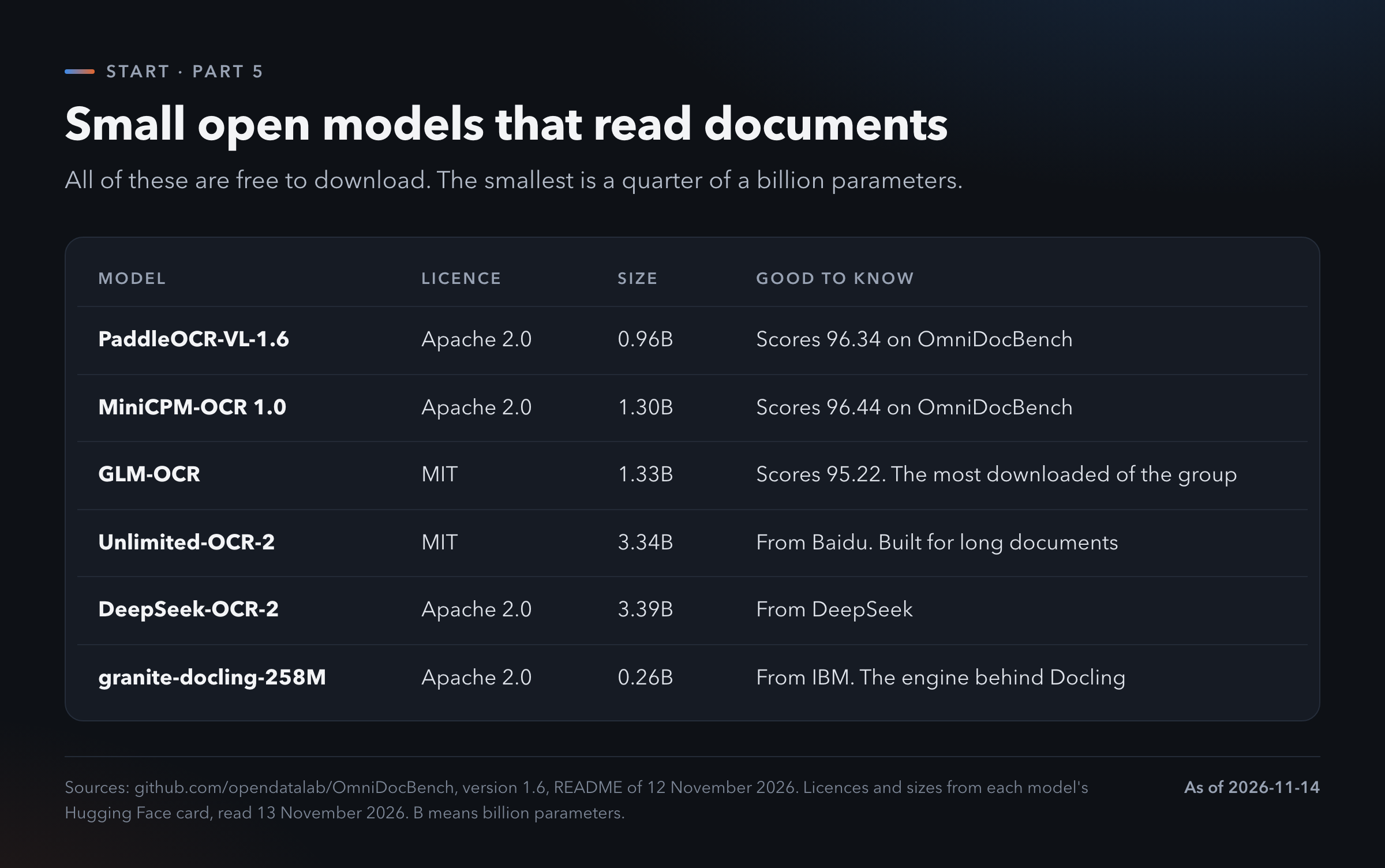
The best open pick. PaddleOCR-VL-1.6. Apache 2.0, under a billion parameters, near the top of the test [2]. For very long documents, Unlimited-OCR-2 from Baidu is built for that and carries an MIT licence.
These models are small. A chat model you would want to use has tens of billions of parameters. These have one or two.
The cheapest way to try. Docling and MinerU are free tools that wrap these models. You point them at a PDF and get Markdown back. Both run from the command line, so ask your coding agent to set one up. That is a five-minute job for it.
If your documents are private, this is the family to run at home first. Contracts, medical letters and bank statements never leave your machine.
6. Speech
Two jobs live here. They run in opposite directions.
Speech to text. A recording goes in, a transcript comes out. Meetings, interviews, voice notes, subtitles.
The measure is word error rate: of every hundred words, how many are wrong. Lower is better. Artificial Analysis tests 64 models [7].
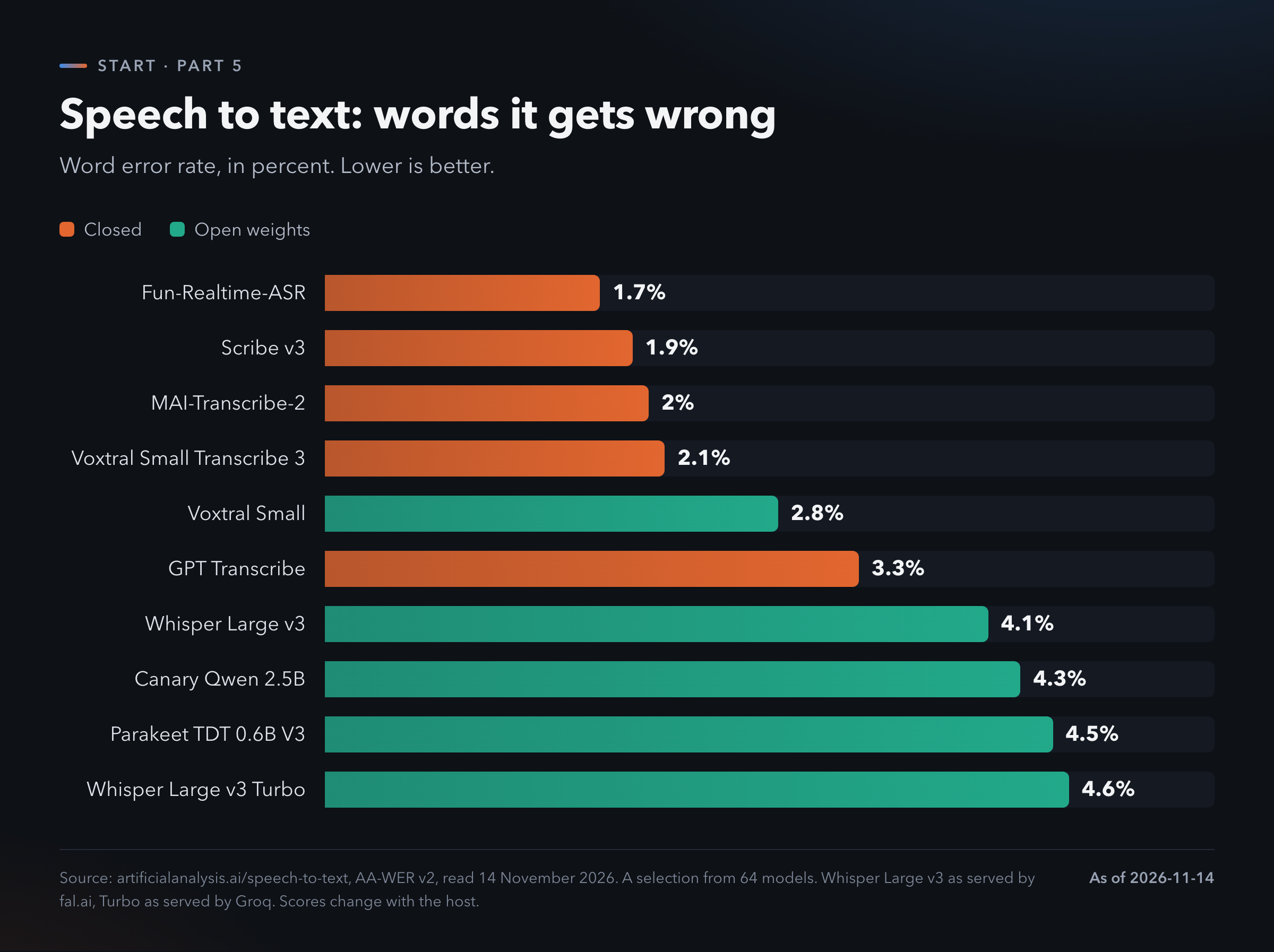
Fun-Realtime-ASR leads with 1.7 percent. Scribe v3 from ElevenLabs has 1.9. MAI-Transcribe-2 has 2.0.
The open models are close. Voxtral Small from Mistral gets 2.8 percent under an Apache licence. Whisper Large v3 gets 4.1. Parakeet from NVIDIA gets 4.5.
Four words wrong in a hundred is good enough for meeting notes. For subtitles you publish, the difference between 2 and 4 is an hour of corrections.
The price is almost nothing. Whisper Large v3 Turbo on Groq costs 67 cents for a thousand minutes of audio. That is nearly 17 hours.
One thing to know. The same model scores differently on different hosts. Whisper Large v3 gets 4.1 percent on one host and 10.1 on another [7]. If a transcript looks bad, try another host before blaming the model.
Text to speech. Text goes in, a voice comes out. Narration for a video, an article read aloud, a voice for an app.
This is ranked by blind vote again [8].
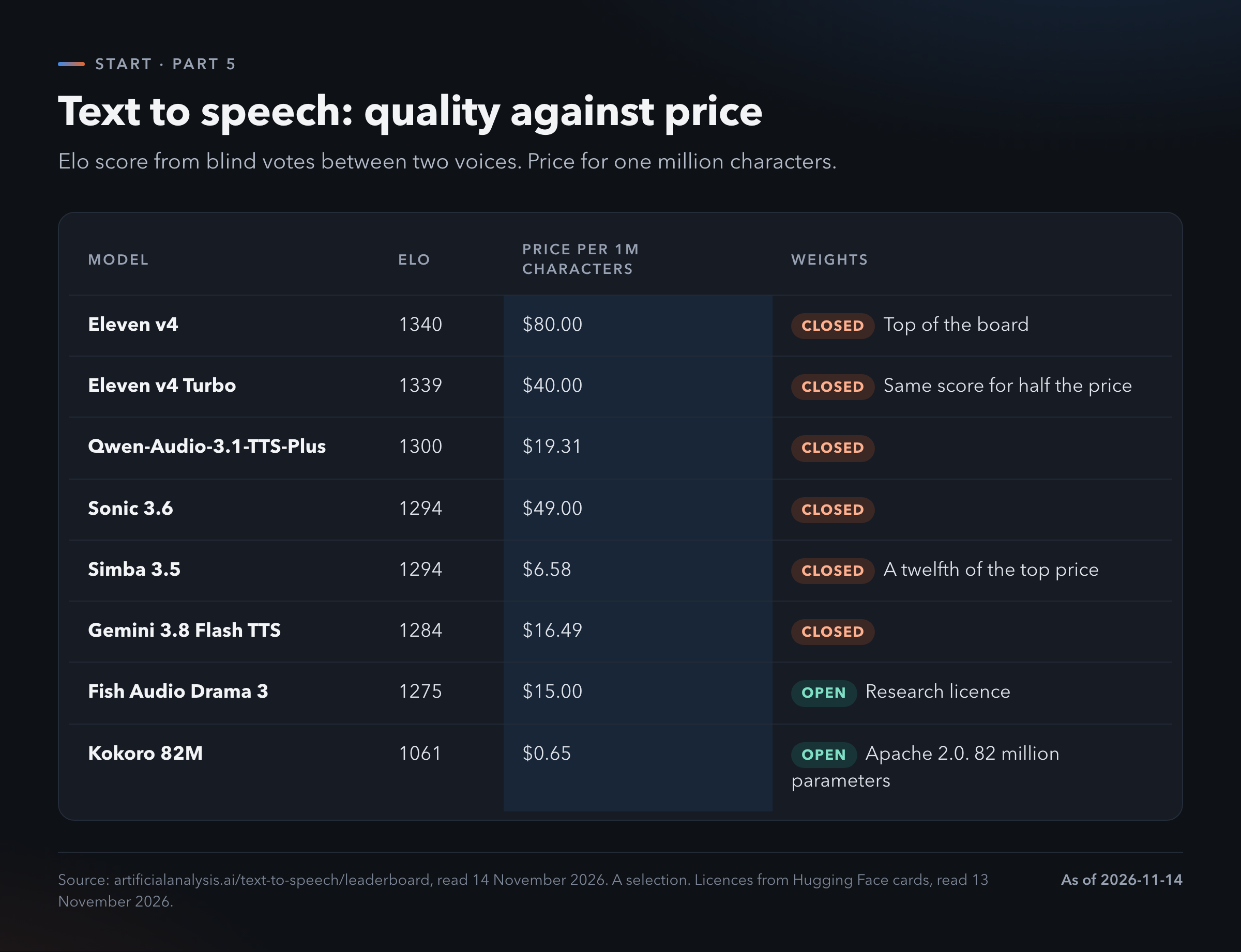
Eleven v4 leads with 1340 points at 80 dollars per million characters. Eleven v4 Turbo scores 1339 for 40 dollars. One point of difference, half the price.
Simba 3.5 scores 1294 and costs 6.58 dollars. That is a twelfth of the top price for a voice most listeners will accept.
The best open pick. Kokoro. It has 82 million parameters, which is tiny. It carries an Apache 2.0 licence and has been downloaded more than 12 million times [2]. It scores 1061, clearly below the leaders. For reading text aloud to yourself it is fine.
Fish Audio Drama 3 scores much higher at 1275 and its weights are public. Its licence is for research only.
The cheapest way to try. For transcripts, a hosted Whisper. For voices, the free tier of any of the services, then Kokoro at home if you need volume.
7. Music and sound
What it is for. A backing track for a video, a jingle, a song from your own lyrics. Also sound effects: a door, rain, a crowd.
Who leads. Artificial Analysis ranks 14 models that make songs with vocals [9]. ACE Music v1 has 1160 points. Suno v6 has 1144 and Suno v6-mini has 1132. The margin is about 18 points either way, so these three are close to a tie.
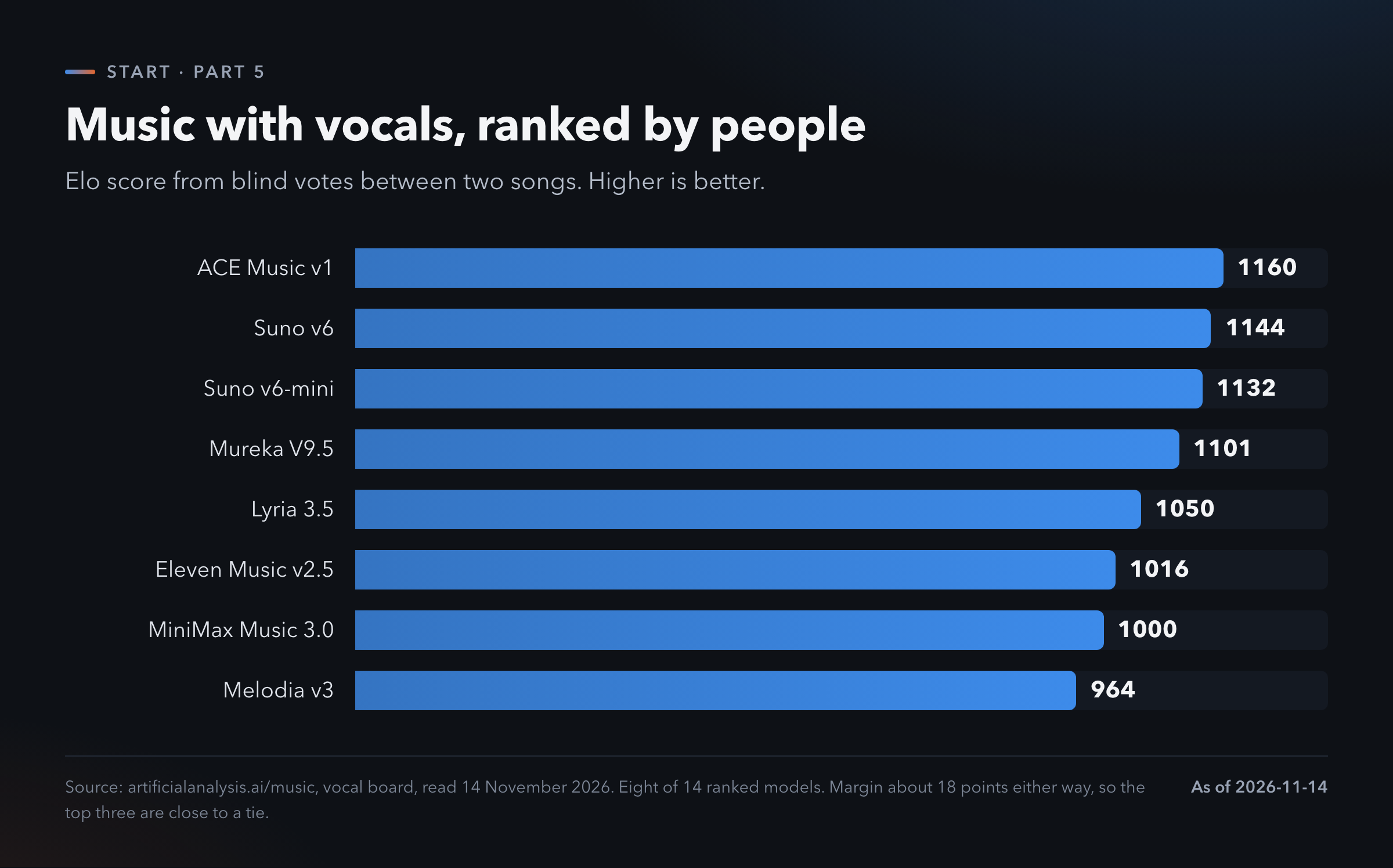
Suno is the name most people know and it runs as a web app. You type a description and get a song.
The best open pick. ACE-Step 1.5. It carries an MIT licence, the most permissive kind [2]. Its model card claims it runs in under 4 GB of graphics memory and makes a song in under ten seconds on a fast card. That is the maker's claim. I did not measure it.
Stable Audio 3 is the other open name, under Stability's community licence.
The licence catch is sharp here. Several well-known open music models are non-commercial: YuE2, MusicGen and AudioGen [2]. You can play with them. You cannot put the result in a product.
Who owns the song. The hosted services have their own terms about what you may do with the output on each plan. They change. Read the current terms yourself before you publish or sell a track.
The cheapest way to try. The free tier of a web service for a first song. ACE-Step in ComfyUI when you want to make many.
8. 3D
What it is for. A 3D model from a sentence or from a photo. Assets for a game, a figure for a 3D printer, an object for a product page.
There is no board. I found no public ranking for this family. Judge by trying.
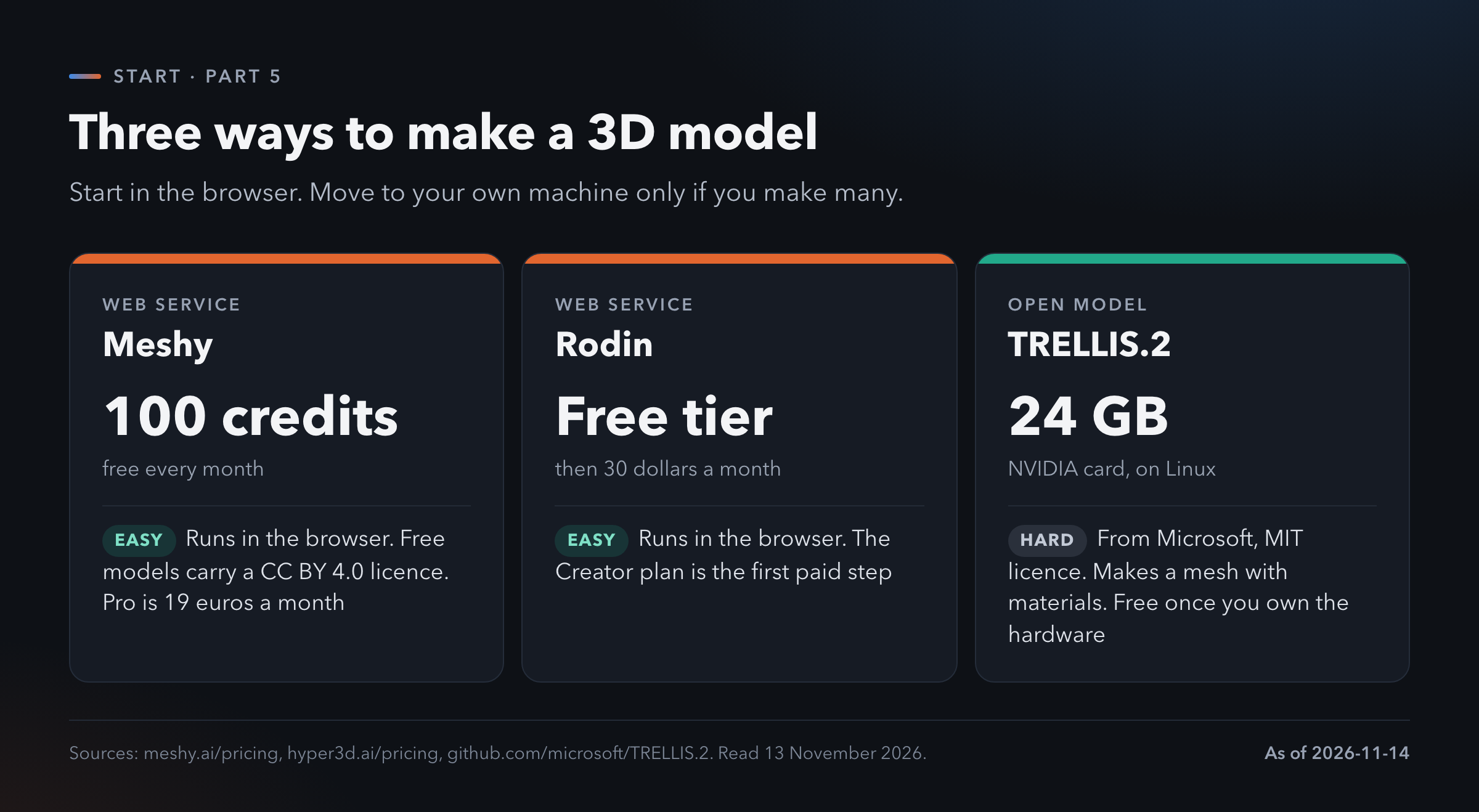
The services. Meshy runs in the browser. The free plan gives 100 credits a month and the models you make on it carry a CC BY 4.0 licence, which means you must credit Meshy. The Pro plan is 19 euros a month [10].
Rodin has a free tier too. Its first paid plan, Creator, is 30 dollars a month [10].
The best open pick. TRELLIS.2 from Microsoft, under an MIT licence. It makes a mesh with materials. It needs an NVIDIA card with 24 GB of memory and it runs on Linux [11]. That is a serious machine.
Hunyuan3D from Tencent is the other open name. Its licence does not cover the EU, the UK or South Korea [2].
The cheapest way to try. Meshy's free credits. Move to your own hardware only if you make models every day.
One warning for printing. A model that looks right on screen may not print. Thin walls, holes in the surface, parts floating in the air. Check it in your slicer before you trust it.
9. The helpers
Some specialists never show you anything. They work inside other tools.
Embeddings. An embedding model turns a piece of text into a list of numbers. Texts with similar meaning get similar numbers. That is how a tool finds the three relevant pages in a thousand documents before the chat model reads them.
You rarely pick one by hand. If a tool asks, Qwen3-Embedding-0.6B and embeddinggemma-2 are small, open and Apache licensed [2]. The public board is MTEB [12].
Rerankers. A second small model that sorts the search results by how well they answer the question. Qwen3-Reranker-0.6B is the common open one.
The rest of the toolbox. Each of these is free to download:
- SAM 3 from Meta selects an object in a picture or a video.
- BiRefNet removes backgrounds.
- Real-ESRGAN makes a small picture larger.
- Hy-MT2 from Tencent translates.
- Chronos-2 from Amazon forecasts numbers over time, such as sales per week.
You do not need to learn them. You need to know they exist, so you can ask your agent to use one.
10. The licence catch
Part 4 explained that open weights come with a licence. In this part the catches are more common and stranger.
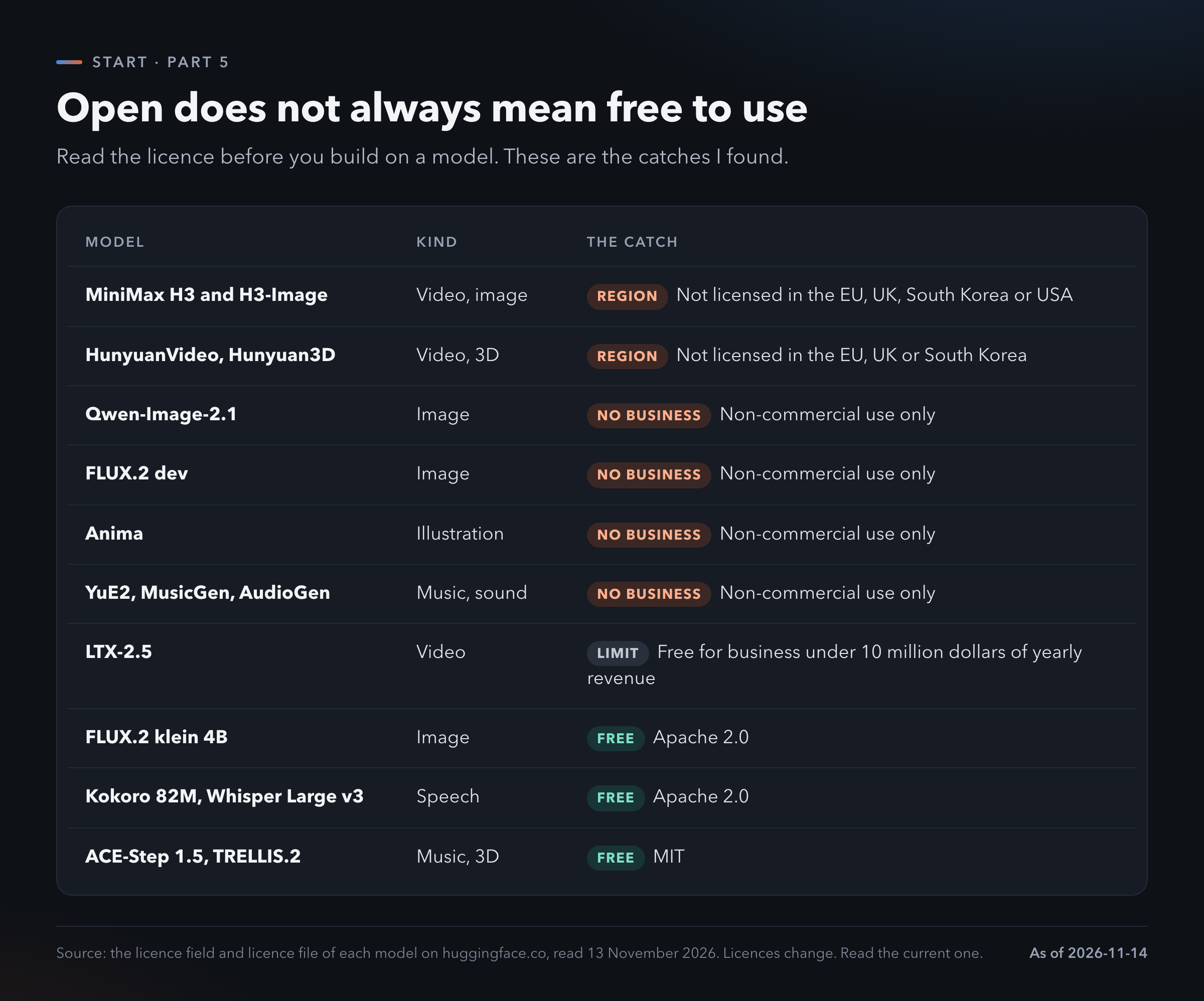
Three kinds of catch.
Region. Some licences leave out whole parts of the world. MiniMax and Tencent both do this [2].
Business use. Non-commercial means you may experiment. You may not earn money with it.
Size. LTX-2.5 is free for a business until it earns 10 million dollars a year.
For personal use, almost everything is fine. The catches bite when you sell something or work inside a company.
The safe names. Apache 2.0 and MIT. When you see one of those, you can use the model for work.
Licences change. The figure is a snapshot. Read the current file on the model's page.
11. Where I would start
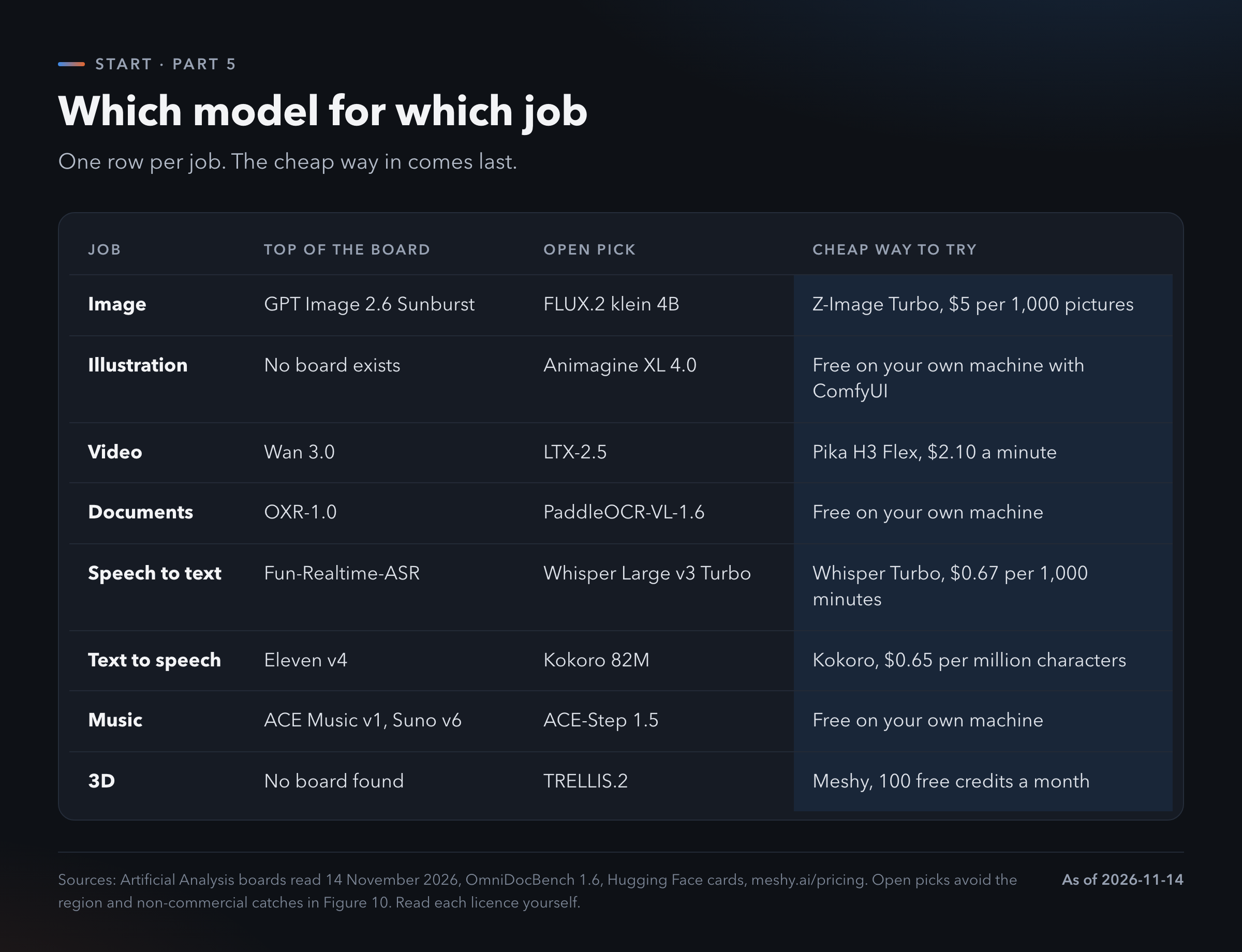
Pick one job that is not text. The one that annoys you most.
For most people that is documents or transcripts.
Take a PDF that your chat app reads badly.
Ask your coding agent to install Docling and convert it.
Read the result next to the original.
Then take a recording of a meeting.
Send it to a hosted Whisper. An hour costs about four cents.
Give the transcript to your chat model and ask for the decisions.
That's it. Two small jobs, almost no money.
Pictures, video and music are more fun. Start with them if you like. The first two save you time every week.
What I am probably getting wrong. Blind votes measure what people like at first sight. They do not measure whether a model follows a precise brief or keeps a character consistent over ten pictures. Two families have no board at all, so my picks there rest on downloads and licences. The ranks and prices are from two days in November. I left out every hardware minimum I could not verify, which is most of them.
Chat is one kind of model.
There is a specialist for most other jobs.
Many of the good ones are free.
TL;DR
- A specialist model does one job: pictures, video, documents, speech, music or 3D. Going to it directly gives you the choice of quality and price.
- Images: GPT Image 2.6 Sunburst leads at 1261 points and 21 cents a picture. Z-Image Turbo costs half a cent.
- Video: the top four are level. Prices run from 2.10 to 34.12 dollars a minute. Sora closed in 2026.
- Documents: open models score within one point of the best on OmniDocBench. PaddleOCR-VL-1.6 is free and under a billion parameters.
- Speech: the best transcription gets 1.7 words wrong in a hundred. Whisper Turbo costs 67 cents for a thousand minutes.
- Music and 3D: ACE-Step 1.5 and TRELLIS.2 are open under MIT. The web services are the easy way in.
- Read the licence. Some open models exclude the EU and others forbid business use. Apache 2.0 and MIT are the safe names.
Which model for this job
Copy this into any chat model. It asks about your job and helps you choose.
I want to pick an AI model for a job
that is not plain chat.

Ask me these questions one at a time.
Wait for my answer before the next one.

1. What goes in and what should come out?
   (text, picture, video, document,
   audio, music, 3D model)
2. Is this for personal use, for a
   business or for something I will sell?
3. Which country am I in?
4. How many do I need per month?
   One, a hundred, ten thousand?
5. Is the material private?
6. What computer do I have? Ask for the
   graphics card and its memory.

Then give me:
- the family of model I need
- one hosted option and one open option
- the licence of the open option and
  whether it allows my use in my country
- the public leaderboard where I can
  check the current ranking myself
- the cheapest way to try it today

Rules:
- Search the web for current rankings
  and prices. Give the date you read them.
- If you cannot verify a licence or a
  price, say so. Do not guess.
- Use plain words. Explain any term
  the first time.
Where to go next
- Part 1. From Free Chat to Agents. Why the free chat lets you down and the five steps that fix most of it.
- Part 2. Who sells what. Subscription against sign-in against API key.
- Part 3. Harness. Why the same model gives a different result. The tools that make the difference.
- Part 4. Open. Open-weight models, Hugging Face and OpenRouter step by step.
- Part 6. Local. Running models on your own machine.
To see the latest model rankings yourself: Artificial Analysis (artificialanalysis.ai) and Arena, formerly LMArena (arena.ai/leaderboard).
References
[1] Artificial Analysis, text-to-image leaderboard, read 14 November 2026. https://artificialanalysis.ai/image/leaderboard/text-to-image
[2] Hugging Face, model cards and licence files of the models named, read 13 November 2026. https://huggingface.co/models
[3] Civitai, model gallery, read 13 November 2026. https://civitai.com/models
[4] Artificial Analysis, text-to-video leaderboard, read 14 November 2026. https://artificialanalysis.ai/video/leaderboard/text-to-video
[5] The Decoder, "OpenAI sets two-stage Sora shutdown", 28 March 2026. https://the-decoder.com/openai-sets-two-stage-sora-shutdown-with-app-closing-april-2026-and-api-following-in-september/
[6] OpenDataLab, OmniDocBench version 1.6, README of 12 November 2026. https://github.com/opendatalab/OmniDocBench
[7] Artificial Analysis, speech-to-text benchmark, read 14 November 2026. https://artificialanalysis.ai/speech-to-text
[8] Artificial Analysis, text-to-speech leaderboard, read 14 November 2026. https://artificialanalysis.ai/text-to-speech/leaderboard
[9] Artificial Analysis, music leaderboard, read 14 November 2026. https://artificialanalysis.ai/music
[10] Meshy and Rodin, pricing pages, read 13 November 2026. https://www.meshy.ai/pricing and https://hyper3d.ai/pricing
[11] Microsoft, TRELLIS.2 repository, read 13 November 2026. https://github.com/microsoft/TRELLIS.2
[12] MTEB, embedding leaderboard, read 13 November 2026. https://huggingface.co/spaces/mteb/leaderboard