Running AI on Your Own Machine
What runs on a laptop, a gaming PC and a Mac, how to set it up in fifteen minutes and where it falls short.
Part 1 drew a map with three layers: access, harness, model.
Every part so far rented the model from someone else.
This part covers the other way. The model is a file on your disk. Your own chip does the work.
People get this wrong in two directions. Some expect a laptop to match the big cloud models. It will not. Others think local AI needs a server room. A free app and an 8 GB machine are enough to start.
This part explains how a model fits in memory, what each kind of machine can run and how to set it up. Then it shows how to point an agent at a local model and what you give up.
I read the documentation, the model pages and the benchmark threads on 13 and 14 November 2026. Every figure carries its date.
1. What local means and why people do it
Local means the model runs on your hardware. You download a file. A small program loads it. You type and your own chip writes the answer.
People do it for five reasons.
Privacy. The text stays on the machine. Ollama, the most used tool, states that it does not see your prompts when a model runs locally [1]. That is the vendor's own statement. Ollama also lists cloud models that run on its servers. They carry a cloud tag. Setting OLLAMA_NO_CLOUD=1 turns them off.
No bill. No price per token. No weekly limit. You paid for the machine already.
Offline. It works on a plane and in a cellar.
Control. A file you downloaded stays the same. Nobody swaps the model under you.
Curiosity. You see how the thing works when you run it yourself.
The price is a smaller model. The best open models are far too big for a home machine. What fits is smaller and scores lower. Section 9 has the numbers.
2. How a model fits in your machine
A model is a long list of numbers. They are called parameters or weights. Qwen3.8 27B has 27 billion of them [2]. Stored in full, at 16 bits each, the file is 54.7 GB [3].
Quantization stores each number with fewer bits. At 8 bits the same model is 29 GB. At 4 bits it is 16.6 GB. At 1 bit it is 6.19 GB [3].
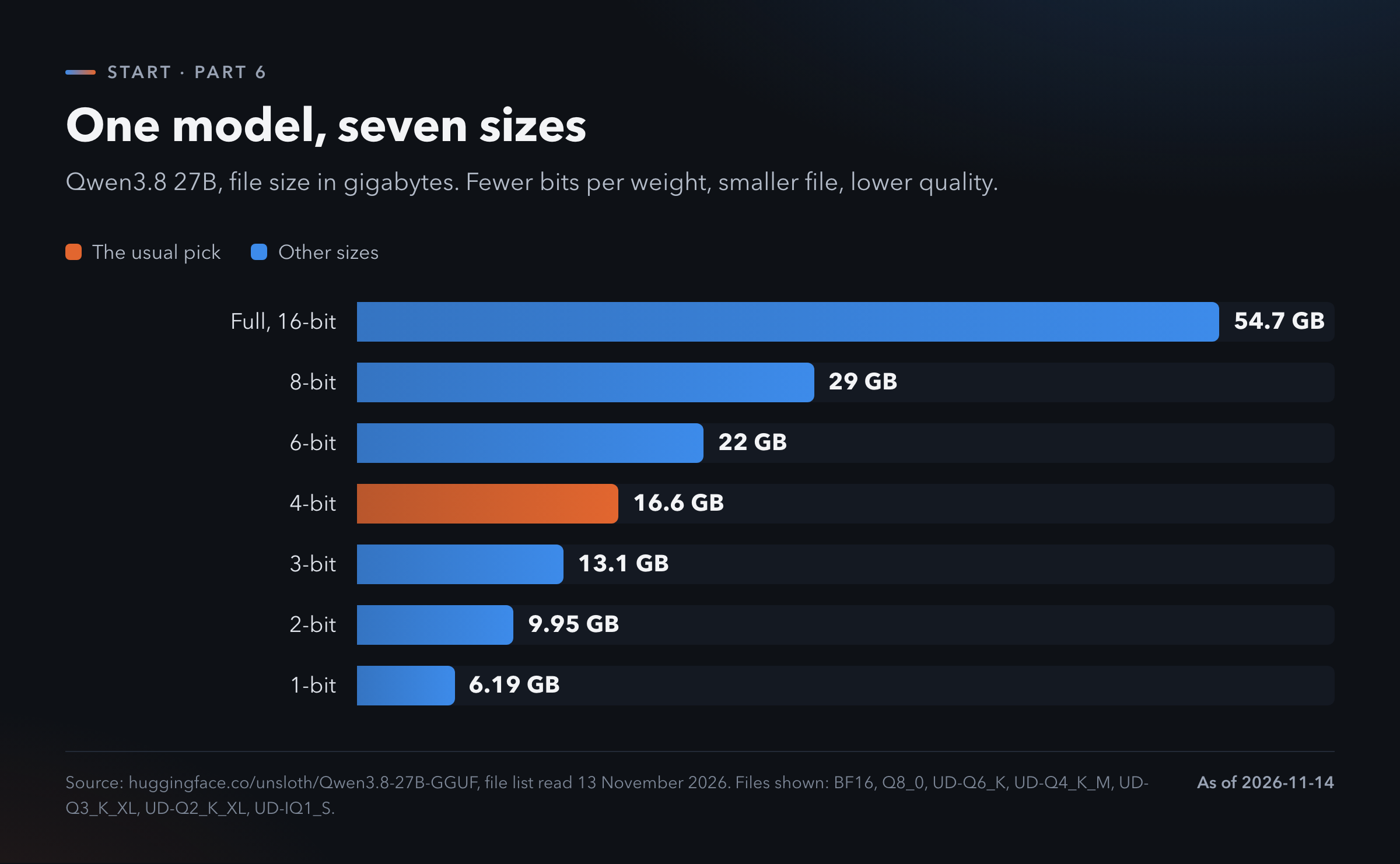
Fewer bits means rougher numbers. The model gets worse as the file gets smaller.
I found no clean measurement of how much each step costs, so I give none. The common advice is 4-bit. LM Studio's own guide says to pick 4-bit or higher [6].
The file format is called GGUF. It is one file. Ollama, LM Studio and llama.cpp all read it [4].
The file names look like code. Q4_K_M means about 4 bits. Q8_0 means 8. On llama.cpp's own table a Q4_K_M file averages 4.89 bits per weight [5].
The file has to fit in memory. Unsloth's rule of thumb: your memory should be at least the size of the file. If it is less, the model still runs. It runs much slower [7].
Which memory counts depends on the machine.
On a PC with a video card, count the video memory. That is where the model runs fast.
On a Mac with an Apple chip, memory is one shared pool. Count the total.
Context takes memory too. Context is the text the model can see at once, counted in tokens. A token is a piece of a word. A longer context needs more memory on top of the file. So do not pick a file that fills your memory to the last gigabyte.
Speed is counted in tokens per second. At 5 you wait for every line. At 50 the text arrives faster than you can read it.
3. What the hardware does
The chip decides the speed. The llama.cpp community keeps benchmark threads where people run the same 7B model at 4-bit on their own hardware [8].
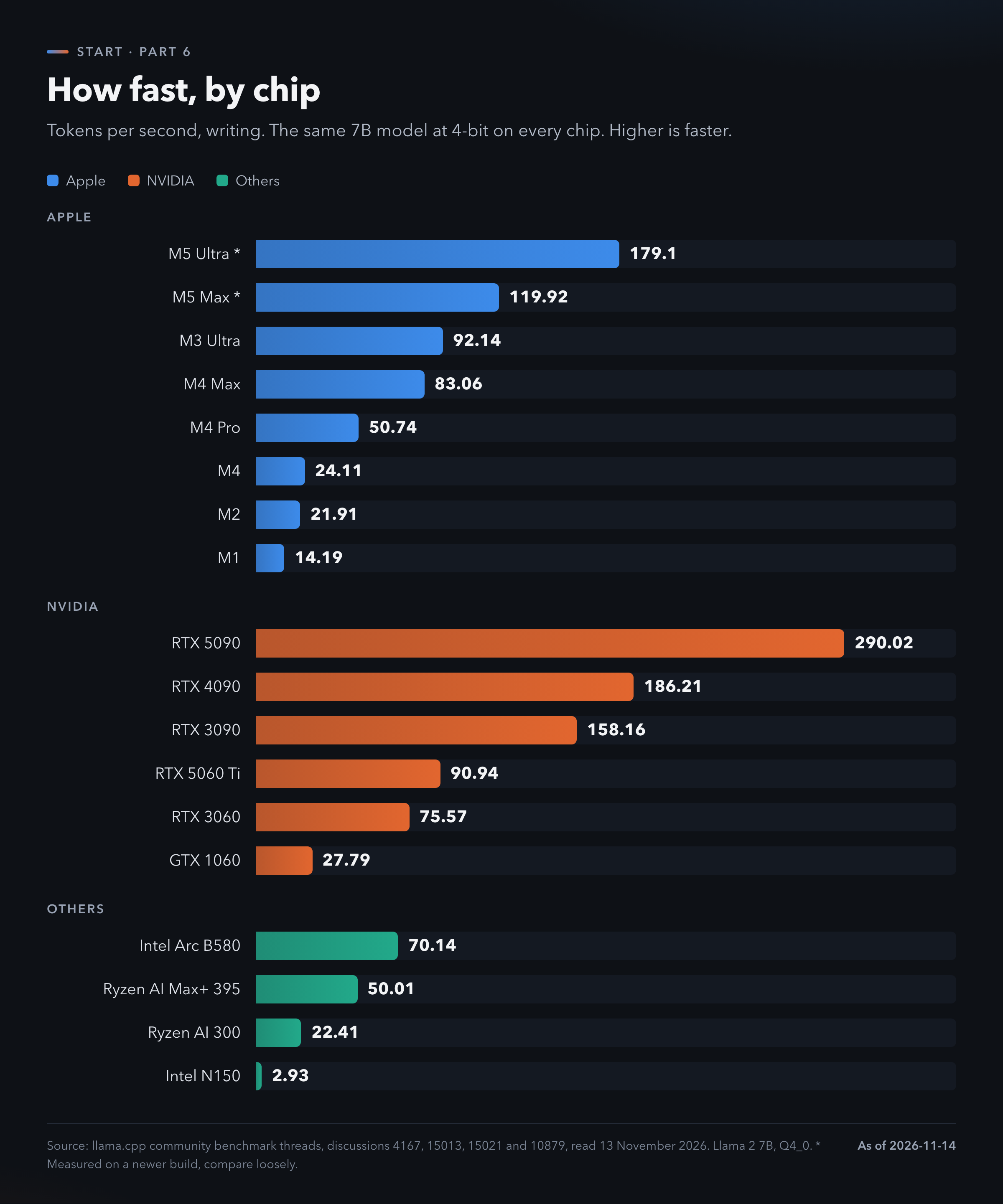
An RTX 5090 writes 290 tokens per second. An RTX 3060 writes 76. A base M4 Mac writes 24. An Intel N150 mini PC writes 2.93.
NVIDIA cards are the fastest. They are also small. A 3060 holds 12 GB. A 3090 or a 4090 holds 24 GB.
Macs are slower and hold more. A Mac Studio with an M5 Max takes up to 128 GB. With an M5 Ultra it takes up to 512 GB [9]. That memory is all usable by the model.
Mini PCs with shared memory sit in between. The Framework Desktop with a Ryzen AI Max+ 395 comes with 64 or 128 GB. NVIDIA's DGX Spark has 128 GB [9].
So the choice is speed against size. A video card runs a mid-size model fast. A big-memory machine runs a large model slowly.
A bigger model is slower on the same chip. Hardware Corner ran a 14B model at 4-bit with a 16,000 token context. The RTX 5090 wrote 102.68 tokens per second, the 3090 wrote 52.14 and the 3060 wrote 22.66 [10].
Power differs a lot. Jeff Geerling measured an M4 Mac mini at 41.31 tokens per second on a 3B model while drawing 30.1 watts. His RTX 4090 system drew 509 watts on a 20B model [11]. The two tests used different models, so compare the watts and leave the speeds alone.
No video card at all still works. One tester ran Gemma 4 E2B on an Intel i5 with 12 GB and no video card. It wrote 9.9 tokens per second [12]. That is a single test by one author.
I give no hardware prices. They move every week and I did not check them.
4. The tools that run a model
You need one program to load the file. All of the ones below are free.
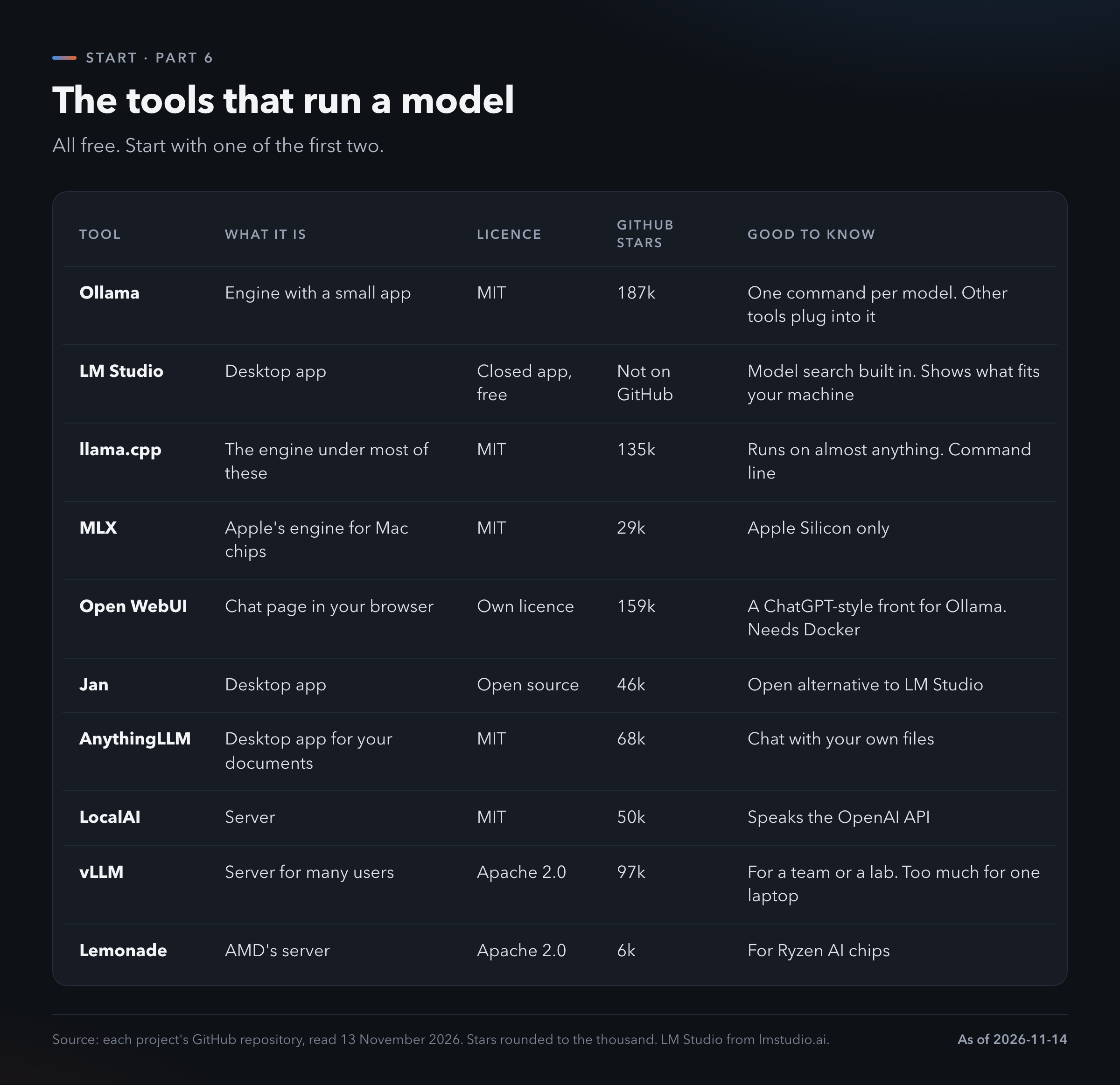
Ollama is the usual first pick. One command downloads a model and starts a chat. It also has a small app with a chat window. Most other tools can plug into it.
LM Studio is a desktop app. It has model search built in and it tells you what fits your machine. The app is free. Its code is closed.
llama.cpp is the engine under most of these. It runs on almost anything. You use it from the command line. Its team joined Hugging Face in February 2026 [14].
MLX is Apple's own engine for Mac chips.
Open WebUI is a chat page in your browser that sits in front of Ollama. It looks like ChatGPT.
Jan is an open alternative to LM Studio. AnythingLLM is built for chatting with your own files.
vLLM and LocalAI are servers. vLLM is for a team or a lab. It is too much for one laptop.
Old guides still send you to GPT4All. Its last release was in February 2025 [13].
Start with Ollama or LM Studio. Pick LM Studio if you never want to see a command line.
5. Which model for which machine
Match the file to your memory. Then leave room for context.
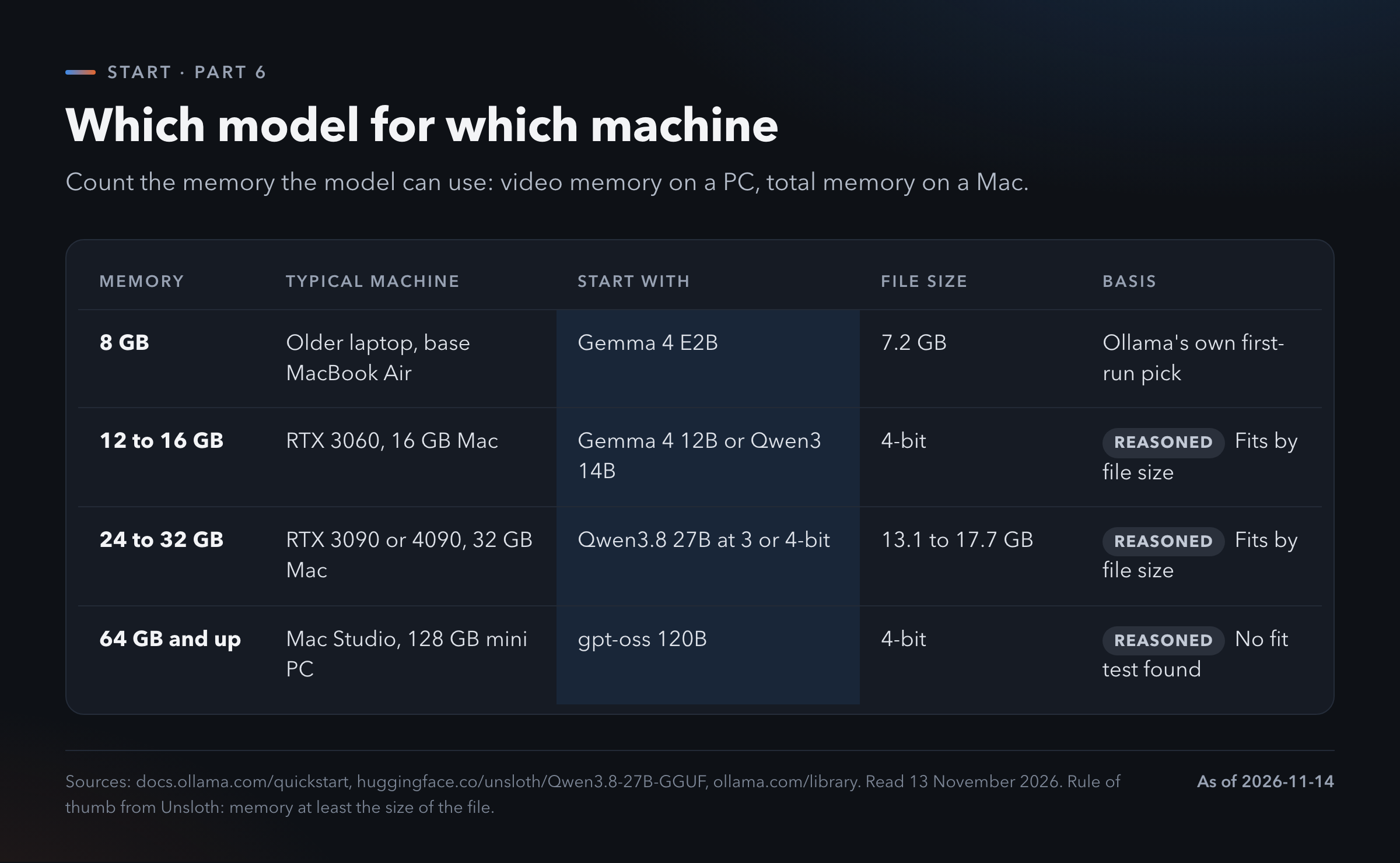
8 GB. Gemma 4 E2B. The file is 7.2 GB. It is the model Ollama's own quickstart tells you to pull first [15].
12 to 16 GB. Gemma 4 12B or Qwen3 14B at 4-bit.
24 to 32 GB. Qwen3.8 27B at 3-bit or 4-bit. Those files run from 13.1 to 17.7 GB [3]. Unsloth says to have 12 to 14 GB for 3-bit and 16 to 19 GB for 4-bit [7].
64 GB and up. gpt-oss 120B at 4-bit.
Only the first row comes from a vendor's own recommendation. The other three I reasoned from file sizes. I did not test them.
Cline's documentation gives a similar ladder for coding: 16 to 32 GB for small or quantized models, 32 to 64 GB for mid-size coding models, 64 GB and more for the large ones [16].
Do not pick by download count. On Ollama's library llama3.1 leads with 121.1 million pulls. gemma4 has 29.1 million and qwen3.8 has 6.4 million [17]. Old models have had more time to collect pulls. Newer ones are usually better at the same size.
6. First run, three ways
A Mac with Ollama. You need macOS 14 or later [15].
- Download Ollama from ollama.com and drag it to Applications.
- Open Terminal.
- Type
ollama pull gemma4:e2band wait for the download. - Type
ollama run gemma4:e2band ask it something. - Type
/byeto leave.
The same two commands work on Windows and Linux.
A Windows PC with LM Studio. LM Studio recommends 16 GB of memory and 4 GB of video memory [6].
- Download LM Studio from lmstudio.ai and install it.
- Open the Discover tab with Ctrl+2.
- Search for a model. Pick a 4-bit file or higher.
- Download it, load it and chat.
A chat page in your browser. Open WebUI runs in Docker and talks to Ollama [18].
docker run -d -p 3000:8080 \
  --add-host=host.docker.internal:host-gateway \
  -v open-webui:/app/backend/data \
  -e WEBUI_SECRET_KEY=your-secret-key \
  --name open-webui --restart always \
  ghcr.io/open-webui/open-webui:main
Replace your-secret-key with the output of openssl rand -hex 32. Then open http://localhost:3000.
Now the trap. Ollama picks the context size for you, based on your video memory [19].
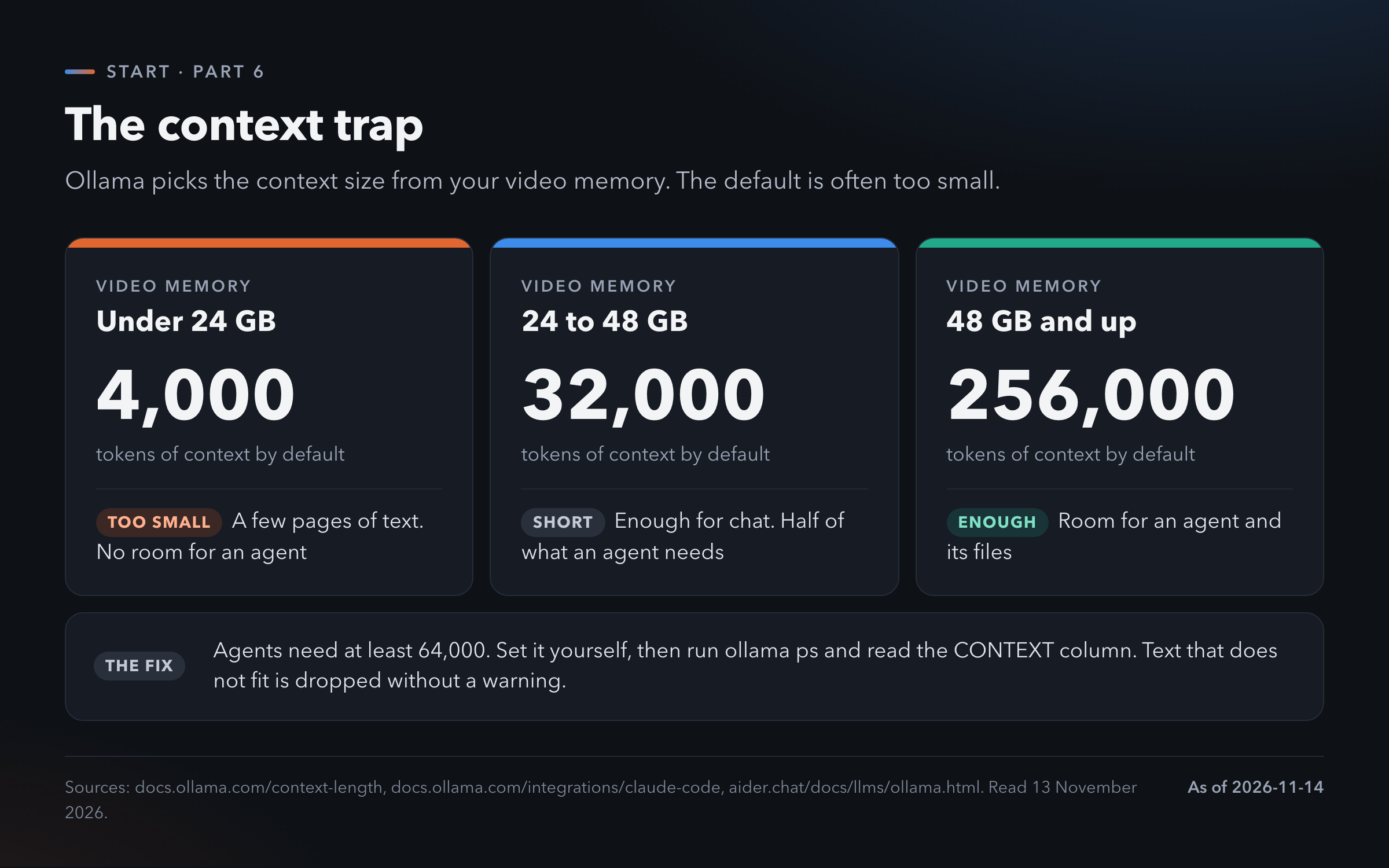
Under 24 GB you get 4,000 tokens. From 24 to 48 GB you get 32,000. At 48 GB and more you get 256,000.
4,000 tokens is a few pages. When your text is longer, Ollama drops what does not fit. It gives no warning [20]. The model then answers as if it never saw the start, because it did not.
Set the context yourself. The Ollama app has a slider in its settings. From the command line, start the server with OLLAMA_CONTEXT_LENGTH=64000 ollama serve.
Then check it. Run ollama ps while a model is loaded. The CONTEXT column shows the real size. The PROCESSOR column should read 100% GPU. If part of the model sits on the CPU, it is too big for your video memory and it will be slow.
A bigger context needs more memory. If the model no longer fits, drop one size down in bits or pick a smaller model.
7. Local models with agents
Part 3 covered the harness. It is the program around the model that reads files, runs commands and checks its own work. Most harnesses can talk to a local model.
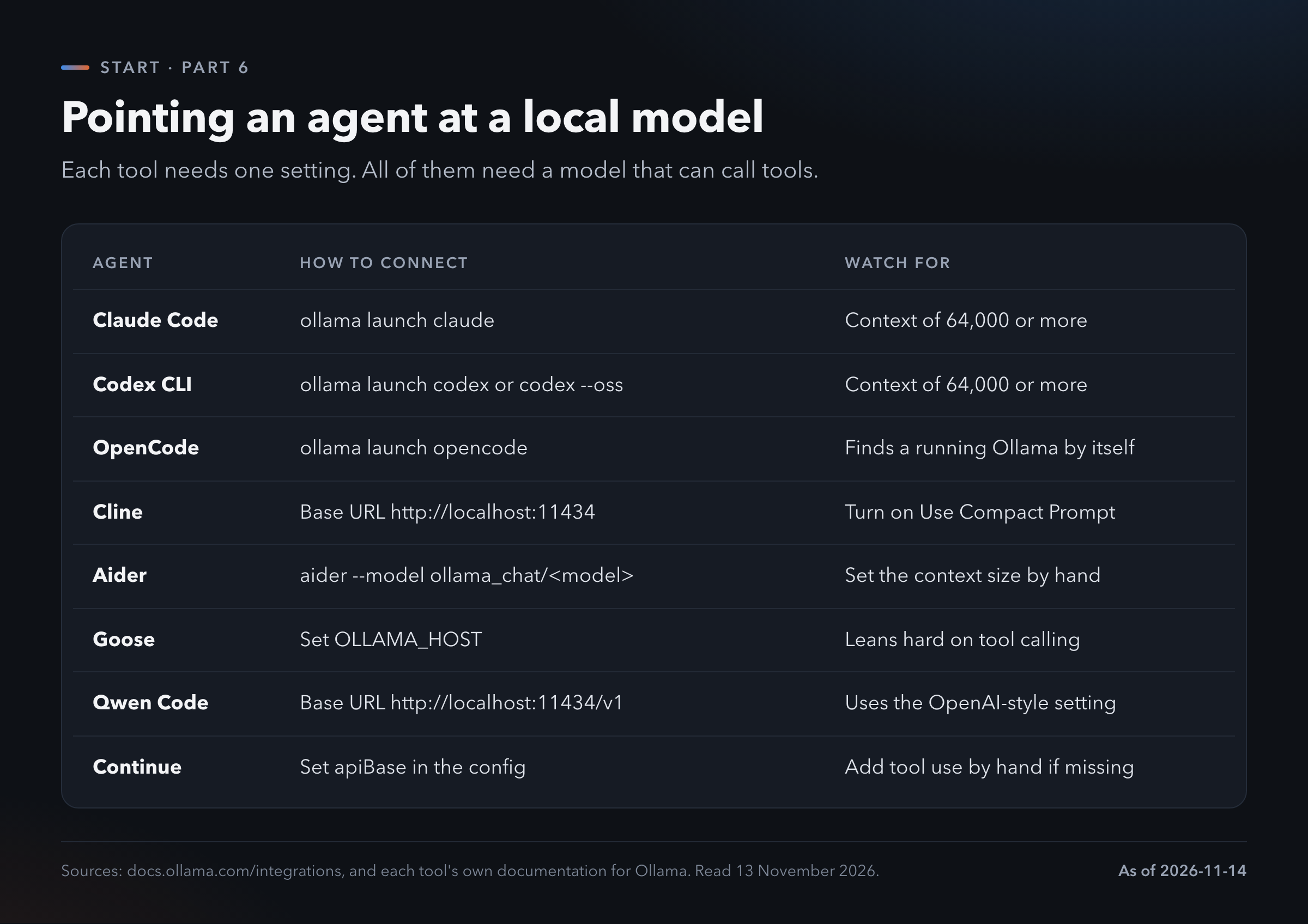
Ollama does the wiring for three of them. ollama launch claude starts Claude Code on a local model. ollama launch codex and ollama launch opencode do the same for Codex CLI and OpenCode [21].
The others need an address. Ollama listens on http://localhost:11434. Tools that expect the OpenAI format use http://localhost:11434/v1. LM Studio has its own server on port 1234. You start it from the Developer tab [26].
Two things have to be right.
The first is context. Ollama's documentation says agents need at least 64,000 tokens [19]. With the 4,000 default an agent forgets its own instructions.
The second is tool calling. An agent works by asking the model to call tools. A model that cannot do that will chat and do nothing. Goose's documentation says it relies heavily on tool calling [21]. Check the model page for tool support before you download.
Expect less than the cloud gives you. An agent reads a lot of text before it writes a line. On a slow chip that is a long wait. A small model also makes more mistakes over a long task. Section 9 shows how large the distance is.
A local agent is fine for small jobs on private files. For serious work most people still rent the model.
8. What people do with it
Private text. Contracts, medical letters, a diary, notes from work you may not paste into a website. A local model can summarize and rewrite them. Nothing is uploaded.
Your own documents. AnythingLLM and Open WebUI let you load a folder of files and ask questions about it.
Voice at home. Home Assistant can run its voice assistant fully local. Its documentation gives two options on a Raspberry Pi 4. Speech-to-Phrase answers in under a second. Whisper takes about 8 seconds per command [22].
Work without a connection. Drafting on a train. Code help in a building with no network.
Learning. Changing the bits, the context and the model teaches you more about how these systems behave than any article.
These are uses the tools are built for. Apart from the Home Assistant numbers I found no measurements of how well they work, so I give none.
9. What you give up
You give up quality. Artificial Analysis scores models on one index [23].
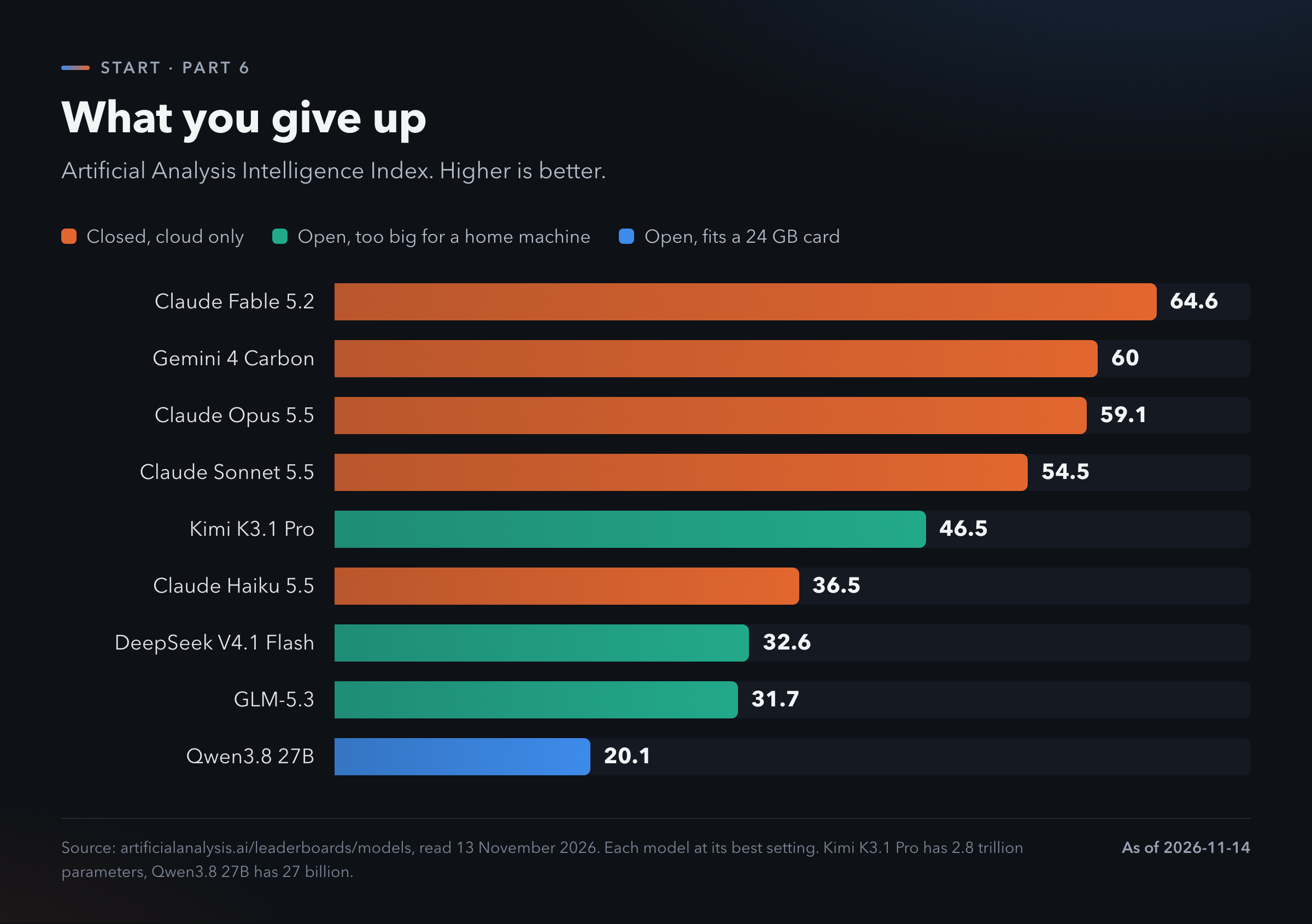
The best closed model scores 64.6. The best open model, Kimi K3.1 Pro, scores 46.5. It has 2.8 trillion parameters. No home machine runs it.
Qwen3.8 27B fits a 24 GB card. It scores 20.1.
The smallest paid Claude model, Haiku 5.5, scores 36.5.
So the model on your desk sits well below the cheapest cloud tier. That is the trade. For rewriting a letter it does not matter. For a long coding task it does.
The score is for the full model. You run a quantized copy. One community test on the Level1Techs forum found that quantization and serving settings change what a model writes. In that test one 4-bit format failed a tool-call check that the other formats passed [24]. It is one author and a small sample. Treat it as a warning. Nobody has proved it as a rule.
You give up speed on small machines. Figure 2 shows the range. It runs from 290 tokens per second to under 3.
You give up convenience. Web search, file upload, memory and voice come built into the chat apps. On your own machine you add each one yourself.
It is not free. The machine costs money and so does the electricity. I did not find a break-even figure I trust, so I give none. If saving money is the only reason, do the sum for your own machine before you buy anything.
10. Where I would start
Use the machine you have.
Find out how much memory it has. On a PC, find the video memory.
Install Ollama or LM Studio.
Pull the model from Figure 4 that matches your memory.
Chat with it for a week. Give it the same questions you give your cloud model.
Set the context to 64,000 before you try an agent. Check it with ollama ps.
Buy hardware only after you know what you miss.
That's it. One tool, one model, the machine you own. Stay with it for a month before you spend money.
Three sites estimate what a machine can run: canirunthisllm.com, llmfit.io and the llmfit project on GitHub [25]. They are estimators. I did not test them.
What I am probably getting wrong. Three of the four picks in Figure 4 are reasoned from file sizes. I did not run them. The speeds in Figure 2 come from a 7B model that is old now. Newer and bigger models run slower. The benchmark numbers are from volunteers on their own machines. I left out hardware prices, running cost and any measure of what quantization does to quality, because I found nothing I could check. Star counts and scores are from 13 November 2026 and will be stale within weeks. Image, speech and video models are left for Part 5.
Local is the smallest model with the most control.
Start with the machine you own.
Rent the rest.
TL;DR
- Local means the model is a file on your disk and your own chip runs it. You get privacy, no bill and offline use.
- Quantization shrinks the file. Qwen3.8 27B goes from 54.7 GB at 16 bits to 16.6 GB at 4 bits. 4-bit is the usual pick.
- The file has to fit in memory. Count video memory on a PC and total memory on a Mac.
- NVIDIA cards are fastest. Macs and big-memory mini PCs are slower and hold larger models.
- Ollama or LM Studio gets you running in about fifteen minutes. An 8 GB machine can start with Gemma 4 E2B.
- Ollama's default context is 4,000 tokens under 24 GB of video memory. Agents need 64,000. Set it yourself and check with
ollama ps. - A model that fits a 24 GB card scores 20.1 on the Artificial Analysis index. The best cloud model scores 64.6.
Tell me what my machine can run
Paste this into any chat model that can search the web.
I want to run an AI model on my own
machine. Help me pick one.

Ask me these one at a time:
1. Mac or PC? Which chip or video card?
2. How much memory? On a PC, how much
   video memory?
3. What is it for: chat, writing, code,
   an agent, private documents?
4. Do I need it to work offline?

Then give me:
- one tool to install: Ollama or
  LM Studio
- one model and one size in bits, with
  the file size in GB
- the context size to set
- what it will not do well

Rules:
- The file must be smaller than my
  memory. Leave room for context.
- Search the current model pages. Do
  not answer from memory. Give links.
- If my machine is too small, say so.
Where to go next
- Part 1. From Free Chat to Agents. Why the free chat lets you down and the five steps that fix most of it.
- Part 2. Who sells what. Subscription against sign-in against API key.
- Part 3. Harness. Why the same model gives a different result. The tools that make the difference.
- Part 4. Open. Open-weight models, Hugging Face and OpenRouter step by step.
- Part 5. Specialist. The models that are not chat: image, speech, music, 3D, documents.
To see the latest model rankings yourself: Artificial Analysis (artificialanalysis.ai) and Arena, formerly LMArena (arena.ai/leaderboard).
References
[1] Ollama FAQ, privacy, cloud models and memory settings, read 13 November 2026. https://docs.ollama.com/faq
[2] Qwen3.8 27B model card, read 13 November 2026. https://huggingface.co/Qwen/Qwen3.8-27B
[3] Unsloth, Qwen3.8 27B GGUF file list, read 13 November 2026. https://huggingface.co/unsloth/Qwen3.8-27B-GGUF
[4] Hugging Face, GGUF documentation, read 13 November 2026. https://huggingface.co/docs/hub/gguf
[5] llama.cpp, quantize README with bits per weight, read 13 November 2026. https://github.com/ggml-org/llama.cpp/blob/master/tools/quantize/README.md
[6] LM Studio, download page and system requirements, read 13 November 2026. https://lmstudio.ai/download and https://lmstudio.ai/docs/app/system-requirements
[7] Unsloth, Qwen3.8 guide with memory guidance, read 13 November 2026. https://unsloth.ai/docs/models/qwen3.8
[8] llama.cpp community benchmark threads, discussions 4167, 15013, 15021 and 10879, read 13 November 2026. https://github.com/ggml-org/llama.cpp/discussions/4167
[9] Hardware specification pages, read 13 November 2026. https://www.apple.com/mac-studio/specs/ and https://frame.work/desktop and https://www.nvidia.com/en-us/products/workstations/dgx-spark/
[10] Hardware Corner, GPU ranking for local models, read 13 November 2026. https://www.hardware-corner.net/gpu-ranking-local-llm/
[11] Jeff Geerling, ai-benchmarks, read 13 November 2026. https://github.com/geerlingguy/ai-benchmarks
[12] It's FOSS, testing local models without a video card, read 13 November 2026. https://itsfoss.com/testing-local-llms-without-gpu
[13] GitHub repositories of each tool in Figure 3 and of GPT4All, read 13 November 2026. https://github.com/ollama/ollama and https://github.com/ggml-org/llama.cpp
[14] Hugging Face blog, ggml joins Hugging Face, 20 February 2026. https://huggingface.co/blog/ggml-joins-hf
[15] Ollama, quickstart and macOS pages, read 13 November 2026. https://docs.ollama.com/quickstart and https://docs.ollama.com/macos
[16] Cline, Ollama provider documentation, read 13 November 2026. https://docs.cline.bot/provider-config/ollama
[17] Ollama library sorted by popularity, read 13 November 2026. https://ollama.com/library?sort=popular
[18] Open WebUI, quick start, read 13 November 2026. https://docs.openwebui.com/getting-started/quick-start/
[19] Ollama, context length and Claude Code integration pages, read 13 November 2026. https://docs.ollama.com/context-length and https://docs.ollama.com/integrations/claude-code
[20] Aider, Ollama documentation, read 13 November 2026. https://aider.chat/docs/llms/ollama.html
[21] Ollama integrations page. Each agent's own documentation for Ollama. Read 13 November 2026. https://docs.ollama.com/integrations
[22] Home Assistant, local voice assistant, read 13 November 2026. https://www.home-assistant.io/voice_control/voice_remote_local_assistant/
[23] Artificial Analysis, model leaderboard, read 13 November 2026. https://artificialanalysis.ai/leaderboards/models
[24] Level1Techs forum, why your local model feels dumber than it is, read 13 November 2026. https://forum.level1techs.com/t/why-your-local-llm-feels-dumber-than-it-is/253917
[25] Can-I-run-it estimators, read 13 November 2026. https://www.canirunthisllm.com and https://llmfit.io and https://github.com/AlexsJones/llmfit
[26] LM Studio, local server documentation, read 13 November 2026. https://lmstudio.ai/docs/developer/core/server