Same Model, Different Result
What sits between you and the model. Why it changes what you get.
Part 1 drew a map with three layers: access, harness, model.
Part 2 covered access.
This part covers the harness.
It is the layer most people never see. They compare models. They argue about which one is smarter. Then they use the smart one through a bare chat window and wonder why it does so little.
This part explains what a harness is, what its parts do and how much it changes the result. Then it lists the ones you can pick today and which fits what.
I read the documentation, the benchmark pages and the price pages on 13 and 14 November 2026. Every figure carries its date.
1. What a harness is
A model does one thing. It reads text and writes the text that should come next.
It cannot open a file. It cannot search the web. It cannot run a command or remember what you told it last week.
Everything that does those things is software around the model. That software is the harness.
The Claude Code documentation describes it as the layer that gives the model its tools and manages what the model sees [1]. Other vendors say scaffold or agent framework. It is the same thing.
Part 1 called the model the brain. The harness is the hands and the desk.
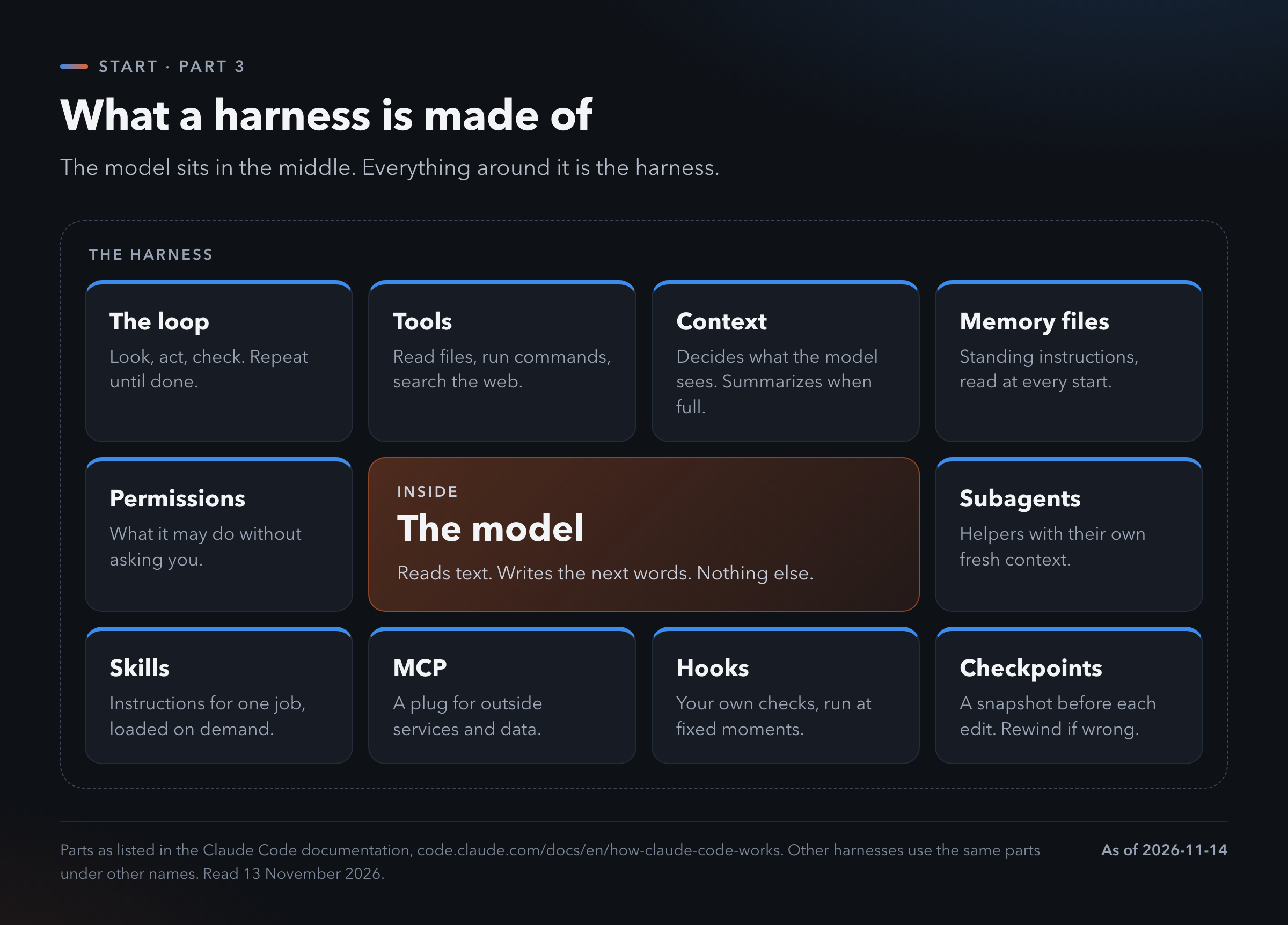
The loop
This is the centre of every agent.
The harness sends your request to the model. The model answers with an action: read this file, run this command. The harness does it and sends the result back. The model looks at the result and picks the next action.
Look, act, check. Again and again until the job is done.
A chat answers once. A loop keeps going. That is the whole difference between chat and agent.
Tools
A tool is something the harness can do for the model: read a file, edit it, run a command, search the web, open a page.
The model never touches your computer. It asks. The harness acts.
Context
A model can only read so much text at once. That space is the context window.
The harness decides what goes in it. Which files. Which earlier messages. When the window fills up, the harness summarizes the old part and carries on. This is called compaction.
A lot of agent quality comes from this one job. A model that reads the wrong files gives a confident answer about the wrong thing.
Memory files
A plain text file with your standing instructions. The harness reads it at the start of every session.
Claude Code reads a file named CLAUDE.md. Many other tools read one named AGENTS.md. You write in it what you would tell a new colleague: how the project is laid out, what to run, what never to touch.
It is the cheapest improvement in this whole article. One file, written once.
Permissions
The harness decides what the agent may do without asking you.
Claude Code has four modes: Manual, Accept edits, Plan and Auto [1]. Manual asks before each action. Plan lets the agent read and propose with no changes at all. Other harnesses have the same idea under other names.
Start strict. Loosen it when you have seen how the agent behaves.
The rest
Subagents. A helper the agent starts for one side job. It works in its own fresh context and returns only the result.
Skills. Instructions for one kind of task, loaded only when that task comes up.
MCP. A standard plug. It connects the agent to outside services such as your calendar, a database or a design tool.
Hooks. Your own checks, run by the harness at fixed moments. For example a test run after every edit.
Checkpoints. A snapshot taken before each edit. If the agent goes wrong you rewind.
You do not need all of these on day one. You need the loop, tools, a memory file and strict permissions.
2. The ladder
Harnesses come in sizes. It helps to see them as a ladder with eight rungs.
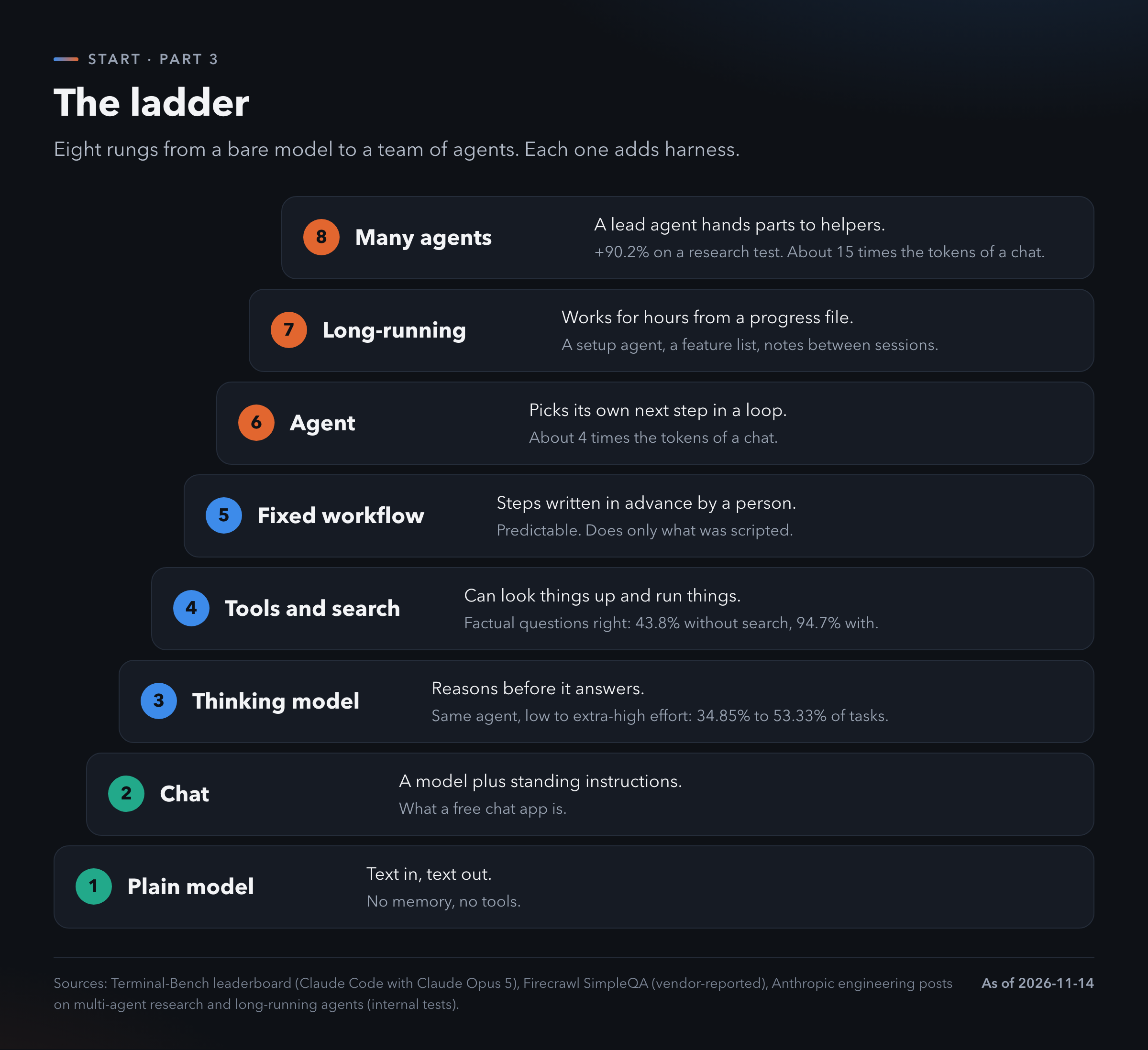
1. Plain model. Text in, text out. This is what a program gets when it calls the API with nothing around it.
2. Chat. A model plus standing instructions and the conversation so far. A free chat app sits here.
3. Thinking model. The model reasons before it answers. Part 1 showed what that does to wrong answers. It shows inside agents too. The Terminal-Bench board lists Claude Code with Claude Opus 5 at five effort settings [2]. At low effort it solves 34.85% of the tasks. At extra-high it solves 53.33%. At max it solves 52.12%, so the top setting is not always the best one.
4. Tools and search. The model can look things up. Firecrawl, which sells a search tool, tested an agent on a set of hard factual questions. Without search it got 43.8% right. With search it got 94.7% [3]. That is the vendor's own test of its own product, so read it as a direction. The direction is clear.
5. Fixed workflow. A person writes the steps in advance. Step one summarize, step two translate, step three send. The model fills in each step. Anthropic's guide on building agents draws the line here: a workflow follows a path written in code, an agent chooses its own path [4]. The same guide advises the simplest setup that does the job. A workflow is predictable and cheap. For a task with known steps it beats an agent.
6. Agent. The loop from section 1. The model picks its own next step. Anthropic reports that agents use about four times the tokens of a chat [5]. That is why Part 2 spent so long on limits and spend caps.
7. Long-running. An agent that works for hours across many sessions. A session ends when the context fills, so the harness needs a way to hand over. Anthropic describes one: a first agent sets up the project and writes a feature list, then each later session reads a progress file, does one piece and updates the file [6]. Notes on disk replace memory.
8. Many agents. A lead agent splits the job and hands parts to helpers that work at the same time. Anthropic reports its multi-agent research system scored 90.2% better than a single agent on its own research test [5]. It also used about fifteen times the tokens of a chat.
Higher is not better. Higher costs more and goes wrong in more ways.
Pick the lowest rung that does the job.
3. Does the harness matter?
The claim you will read everywhere is that the harness matters as much as the model.
Cursor, which makes one, puts it this way: "The harness and the model together determine how good the agent is." [7]
A company that sells a harness would say that. So here is the evidence, both sides.
The case for
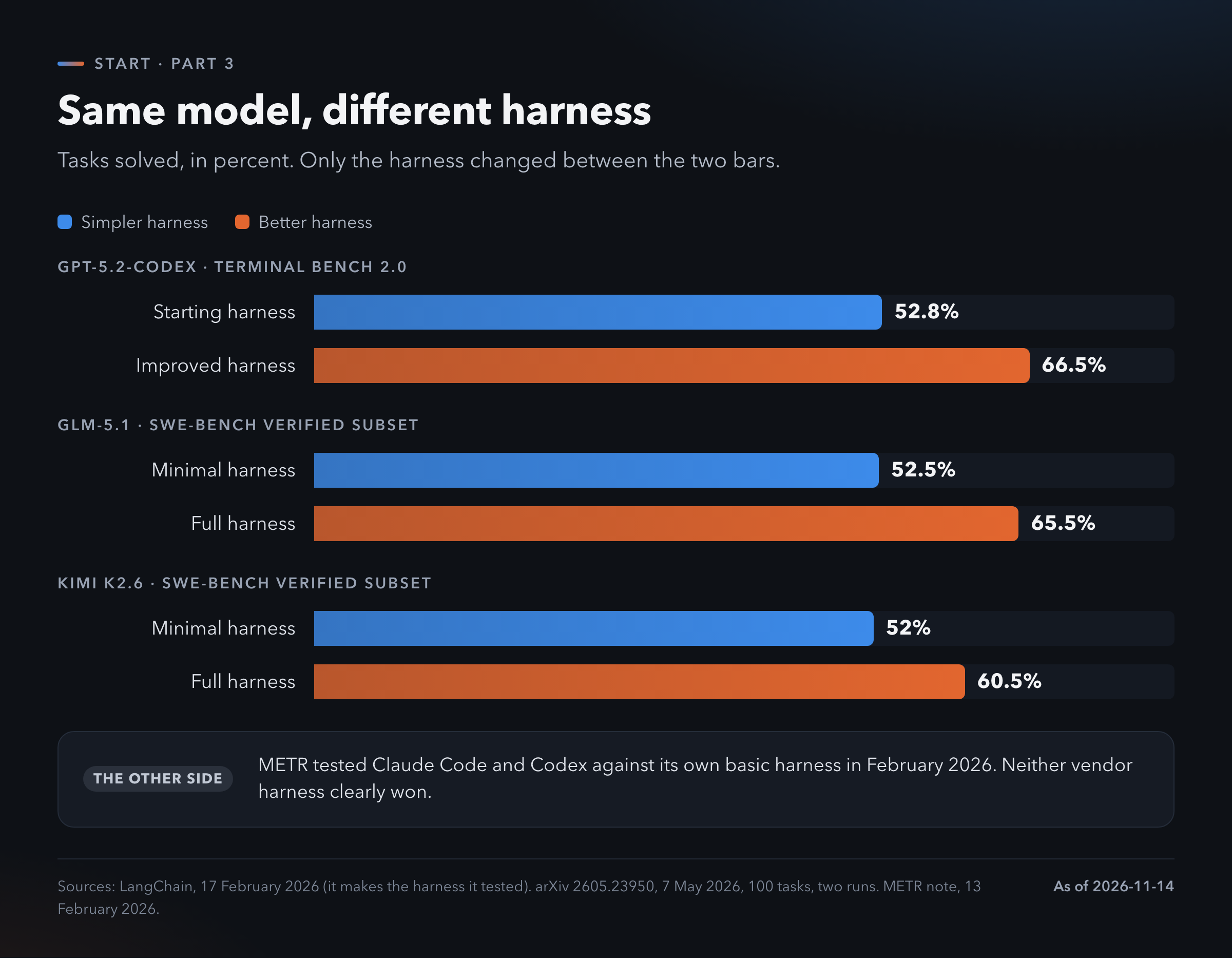
LangChain kept one model fixed: GPT-5.2-Codex. It changed only its own harness. The score on Terminal Bench 2.0 went from 52.8% to 66.5% [8]. LangChain makes that harness.
A study from May 2026 ran three models through three harnesses, from minimal to full, on 100 coding tasks [9]. GLM-5.1 went from 52.5% to 65.5%. Kimi K2.6 went from 52.0% to 60.5%. GPT-5.4 went from 55.0% to 63.5%. In that test the choice of harness moved the scores more than the choice of model. The authors say plainly that this may not hold everywhere.
Kimchi ran one model, GLM-5.2, inside four harnesses on Terminal-Bench 2.1 [10]. Its own harness scored 72.6%. Cursor scored 69.0%, Claude Code 65.4% and OpenCode 59.8%. Thirteen points between top and bottom with the same model. Kimchi sells the harness that came first.
Google says something similar from the other direction. The README of Gemini CLI asks people not to use it to benchmark the newest Gemini models, because that harness was not tuned for them [11].
The case against
METR is an independent lab that measures how long a task an agent can finish. In February 2026 it ran Claude Code and Codex against its own basic harness with the same models [12]. Neither vendor harness clearly won. Across its samples Claude Code came out ahead 50.7% of the time. That is a coin flip.
METR notes the limits of its own test. The budgets were fixed and its wrappers around the vendor tools were rough.
The official leaderboard cannot settle it either. On the Terminal-Bench board almost every model appears with its own maker's harness [2]. Claude Code with Claude Opus 5.5 scores 65.76%. Codex with GPT-6.1 Sol scores 60.91%. You cannot tell from those two rows how much is model and how much is harness.
What to take from it
Most of the positive evidence comes from companies that sell a harness. The neutral test found no clear gap.
Both can be true.
The big gains show up when a bare harness is compared with a full one. Between two mature harnesses the gap is small and sometimes not measurable.
So the practical rule has two halves.
Going from a chat window to any real agent harness is a large step. Take it.
Choosing between two good harnesses is a small step. Choose on price, on what you already pay for and on what feels clear to you.
4. The harnesses you can pick
There are three kinds.
Ones you run yourself
You install them on your computer. Most run in a terminal. Some live inside a code editor.
The tool is free. You bring the model, through a subscription or an API key. Part 2 explained which is allowed where.
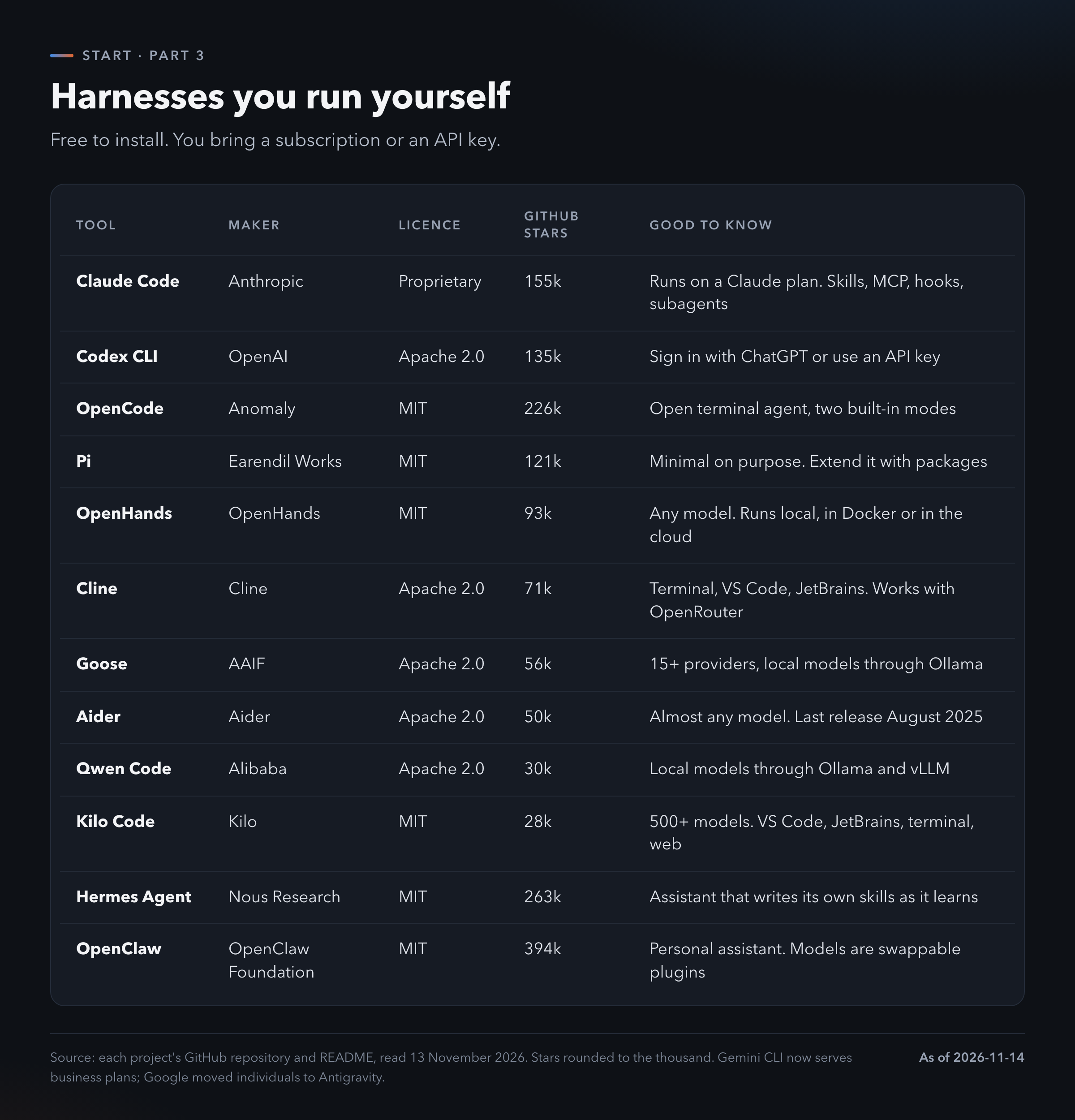
Claude Code and Codex CLI come from the model makers. Each is tuned for its maker's models and runs on the $20 plan you may already have.
OpenCode, Pi, Cline, Kilo Code, Goose, Aider and OpenHands are independent and open source. They work with many models. That makes them the natural choice with an OpenRouter key or a cheap model.
Hermes Agent and OpenClaw are a different animal. They are personal assistants that stay running, reach you through chat apps and act on your accounts. They are powerful. They are also the ones that need the most care with permissions.
Two notes on the table.
Stars measure attention. They do not measure quality.
Check the date of the last release. Aider's was in August 2025. A tool can be good and still fall behind new models.
Ones that come as a product
An app or a cloud service. The maker runs the harness. You sign in and give it work.
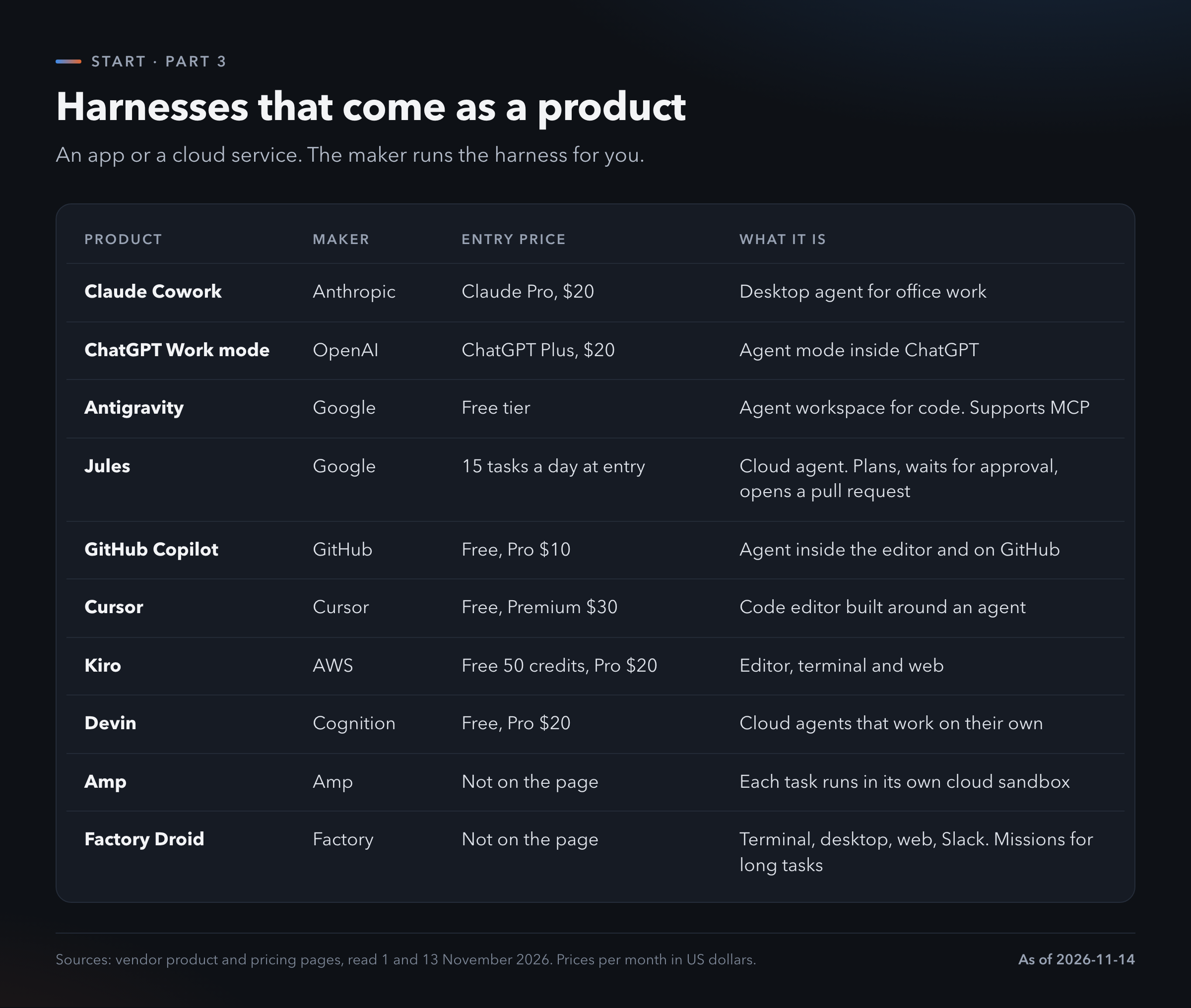
Claude Cowork and ChatGPT Work mode are for work that is not code: documents, spreadsheets, files, research. Each comes with the $20 plan. Cowork is not on the free plan.
Cursor, GitHub Copilot, Kiro and Antigravity put an agent inside a code editor. Each has a free tier.
Jules, Devin, Amp and Factory run in the cloud. You hand over a task and close the laptop. Jules shows the pattern well: it copies your project to a cloud machine, writes a plan, waits for your approval, does the work and opens a pull request for you to review [13].
Kits to build your own
If you write code you can build a harness from parts.
The model makers each publish a kit: the Claude Agent SDK, the OpenAI Agents SDK and Google's ADK. LangGraph, Pydantic AI and smolagents are independent ones.
This is the last thing to try. Use a finished harness for a few months first. You will then know what you want yours to do.
5. Which one fits
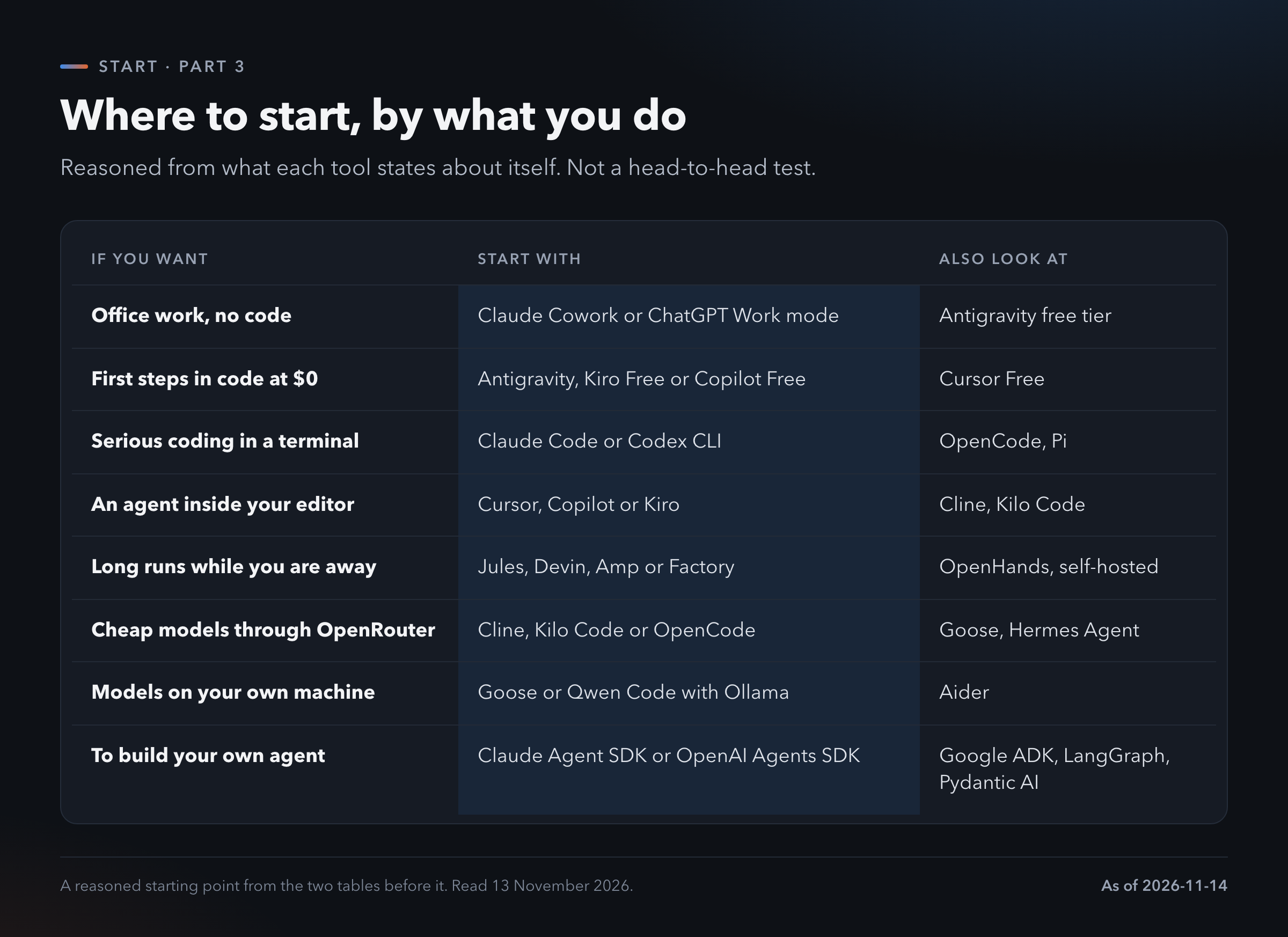
This table is reasoning from what each tool says about itself. Nobody has tested all of them side by side on the same tasks. Section 3 showed how thin that kind of evidence still is.
Three things decide more than the tool's name.
What you already pay for. If you have ChatGPT Plus, Codex and Work mode cost you nothing extra. If you have Claude Pro, the same goes for Claude Code and Cowork. Start there.
Where the work lives. Documents and spreadsheets: a desktop agent. Code on your machine: a terminal or editor agent. Jobs that take hours: a cloud agent.
How much you want to watch. An editor agent shows every change as it happens. A cloud agent shows you the result. Watch closely at first.
6. Where I would start
Not a developer: the desktop agent on the plan you have. Claude Cowork or ChatGPT Work mode.
Developer: Claude Code or Codex CLI on the same plan.
Then five steps, the same in every harness.
Work on a copy. Give the agent one folder with nothing in it you cannot lose.
Keep permissions strict. Let it ask before it changes anything.
Start with a task you can check yourself. Sorting a folder. Turning ten invoices into a spreadsheet. A small script.
Ask for a plan before it acts. Read the plan. Fix it in words.
Write a memory file. Five lines on what the folder is and what you want. Add a line each time the agent repeats a mistake.
That's it. One harness, one folder, one small job. Stay with it for a month before you look at another tool.
What I am probably getting wrong. The evidence in section 3 is thin and most of it comes from companies with something to sell. The single neutral test is from February 2026 and used older models. The picks in section 5 are reasoning, not a test. Star counts and prices are from 13 November 2026 and will be stale within weeks. I left out Windsurf and Manus because I could not confirm their status or prices from their own pages. Amp and Factory show no prices on the pages I read. The parts in section 1 follow the Claude Code documentation, so other harnesses may name or split them differently.
The model is the brain.
The harness is what lets it do anything.
Get a good one before you argue about brains.
TL;DR
- A model only writes text. The harness is the software around it that reads files, runs tools and keeps the loop going.
- The loop is what makes an agent: look, act, check, repeat.
- There are eight rungs from a plain model to many agents. Each rung up costs more tokens. Pick the lowest one that does the job.
- Same model, better harness: 52.8% to 66.5% in one test and 52.5% to 65.5% in another. Most such numbers come from harness makers.
- An independent test found no clear gap between vendor harnesses and a basic one. The big step is from chat to any real harness.
- Start with the agent on the plan you already pay for: Cowork or Work mode for office work, Claude Code or Codex for code.
- One folder, strict permissions, a plan before action and a memory file. That covers most of what goes wrong.
Set up my first agent
Copy this into the agent you picked, in a new empty folder. It sets up the memory file and a safe first task.
You are helping me set up my first agent project.
I am new to this. Use plain words.

Before you change anything, ask me these one at a time:
1. What kind of work do I want help with?
2. Which files will you need? I will copy them into
   this folder. Never look outside this folder.
3. What must you never do without asking me first?
4. How will I check that your work is right?

Then:
- Write a memory file for this folder (AGENTS.md, or
  the name this tool reads). Keep it under 20 lines:
  what the folder is, what I want, what you must
  never do, how to check the work.
- Show me the file and wait for my OK.
- Propose one small first task I can verify myself
  in five minutes. Give me the plan as numbered
  steps. Do not start until I say go.

Rules for every task after this:
- Plan first, then wait for my go.
- Change one thing at a time and tell me what changed.
- If you are not sure, stop and ask.
- When I correct you, add one line to the memory
  file so it does not happen again.
Where to go next
- Part 1. From Free Chat to Agents. Why the free chat lets you down and the five steps that fix most of it.
- Part 2. Who sells what. Subscription against sign-in against API key.
- Part 4. Open. Open-weight models, Hugging Face and OpenRouter step by step.
- Part 5. Specialist. The models that are not chat: image, speech, music, 3D, documents.
- Part 6. Local. Running models on your own machine.
To see how agents rank today: the Terminal-Bench leaderboard (tbench.ai) and METR (metr.org). For models: Artificial Analysis (artificialanalysis.ai) and Arena, formerly LMArena (arena.ai/leaderboard).
References
[1] Claude Code documentation, How Claude Code works, read 13 November 2026. https://code.claude.com/docs/en/how-claude-code-works
[2] Terminal-Bench 2.0 leaderboard, read 13 November 2026. https://www.tbench.ai/leaderboard/terminal-bench/2.0
[3] Firecrawl, SimpleQA benchmark, own test from July 2026, read 14 November 2026. https://www.firecrawl.dev/glossary/web-search-apis/simpleqa-benchmark
[4] Anthropic, Building effective agents. https://www.anthropic.com/engineering/building-effective-agents
[5] Anthropic, How we built our multi-agent research system, 13 June 2025. https://www.anthropic.com/engineering/multi-agent-research-system
[6] Anthropic, Effective harnesses for long-running agents, 26 November 2025. https://www.anthropic.com/engineering/effective-harnesses-for-long-running-agents
[7] Cursor, Continually improving our agent harness, 30 April 2026. https://cursor.com/blog/continually-improving-agent-harness
[8] LangChain, Improving deep agents with harness engineering, 17 February 2026. https://www.langchain.com/blog/improving-deep-agents-with-harness-engineering
[9] arXiv 2605.23950, 7 May 2026. 100 tasks from SWE-bench Verified, two runs each. https://arxiv.org/abs/2605.23950
[10] Kimchi, Same model, different harness, 7 September 2026. 89 tasks, five runs. https://kimchi.dev/blog/same-model-different-harness-terminal-bench
[11] Gemini CLI README, read 13 November 2026. https://github.com/google-gemini/gemini-cli
[12] METR, Measuring time horizon using Claude Code and Codex, 13 February 2026. https://metr.org/notes/2026-02-13-measuring-time-horizon-using-claude-code-and-codex/
[13] Product and pricing pages, read 1 and 13 November 2026: https://claude.com/product/cowork, https://learn.chatgpt.com/docs/get-started-with-work, https://antigravity.google/pricing, https://jules.google, https://cursor.com/pricing, https://kiro.dev/pricing, https://devin.ai/pricing, https://ampcode.com